# [ aka `fds`](http://fastds.io)
[](https://discord.com/invite/9gU36Y6)
[](https://github.com/DAGsHub/fds/actions/workflows/test.yml)
[](https://pypi.python.org/pypi/fastds/)
[](https://lbesson.mit-license.org/)
<a href="https://twitter.com/TheRealDAGsHub" title="DAGsHub on Twitter"><img src="https://img.shields.io/twitter/follow/TheRealDAGsHub.svg?style=social"></a>
---
`fds` is a tool for Data Scientists made by [DAGsHub](https://dagshub.com/) to version control data and code at once.
At a high level, `fds` is a command line wrapper around Git and [DVC](https://dvc.org), meant to minimize the chances of human error, automate repetitive tasks, and provide a smoother landing for new users.
[See the launch blog](https://dagshub.com/blog/fds-fast-data-science-with-git-and-dvc) for more information about the motivation behind this project.
=======
## Installation
- Install `fds` using PIP `pip3 install fastds`
- Once installed successfully, you can start using `fds`
- eg: `fds init` should trigger the init command
- You can also use `sdf` instead of `fds` - it's identical, but might be more fun to type 🤓
## Commands Supported
```
$ fds -h
usage: fds [-h] [-v] {init,status,add,commit,push,save} ...
One command for all your git and dvc needs
positional arguments:
{init,status,add,commit,push,save}
command (refer commands section in documentation)
init initialize a git and dvc repository
status get status of your git and dvc repository
add add files/folders to git and dvc repository
commit commits added changes to git and dvc repository
clone Clones from git repository and pulls from dvc remote
push push commits to remote git and dvc repository
save saves all project files to a new version and pushes
them to your remote
```
## Examples
### `fds status` = `dvc status` + `git status`
`fds status` lets us quickly check the full status of the repo - both DVC and git at the same time, to make sure we don't forget anything.

Here, we can see that we have a small, normal text file - `.gitignore`, plus a `bigfile.txt` and `data` folder which we would want to add to DVC and not to git. `fds` add makes that easy!
### `fds add` = `dvc add` + `git add` wizard 🧙♂️
You're probably used to the convenience of using `git add .` to just track everything. Unfortunately, you have to be careful doing this when working with large files - one wrong move, and you might fry your hard drive by accidentally telling git to track a huge dataset!
We wanted to retain the convenience of just typing one command which means "just track all changes, I'll do a `git commit` in one second", which will be smart enough to avoid the pitfalls of large data files.
`fds add` does exactly that, while interactively asking the user how to handle files. You can add to DVC, or git, recursively step into large folders, skip or ignore files, etc.

Here's the file tree of the repo I used above, with file sizes included. Note how `bigfile.txt` and `data/` were automatically added to DVC and not git:

### `fds commit` = `dvc commit` + `git commit`
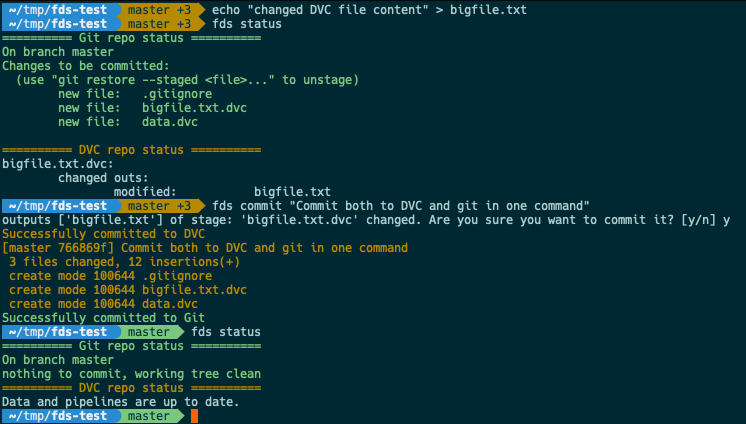
Finally, to close the loop of a real workflow, what happens when I change existing DVC tracked files? Without FDS, you'd have to remember to separately run `dvc repro` or `dvc commit`, then `git add tracked_file.dvc`, and only then `git commit`.
`fds commit` does all that for you - commits changes to DVC first, then adds the `.dvc` files with the updated hashes to git, then immediately commits these changes (plus any other staged changes) to a new git commit. Voila!
### Important note on using FDS inside Jupyter notebooks and Google Colab
FDS is designed for interactive use via prompts that require user input.
While this is possible to do inside Jupyter notebooks, **it won't worh with the `%%bash` magic**.
You have to use `!fds` since `%%bash` prevents user input.
[See Colab example here](https://colab.research.google.com/drive/1Jiu2aaLGFbxHEFG4tvAN3qznTqT6n7QI?usp=sharing)
## Contributing
We would love for you to try out FDS yourself, and to give us feedback. It would really help us to prioritize future features, so please [vote on or create issues](https://github.com/dagshub/fds/issues)!
If you'd like to take a more active part, we have some [good first issues](https://github.com/DAGsHub/fds/issues?q=is%3Aopen+is%3Aissue+label%3A%22good+first+issue%22) that you can start with. We'll be happy to provide guidance on the best way to do so.
And of course, we're always happy to have you on the DAGsHub discord, where you can ask questions or give feedback on FDS:
[](https://discord.com/invite/9gU36Y6)
----
<div style="
display: flex;
align-items: center;
">
<span>Made with ❤️ by </span> <a href="https://dagshub.com"><img src="https://raw.githubusercontent.com/DAGsHub/client/master/dagshub_github.png" width=300 alt="dagshub-logo"/></a>
</div>




