<div>
<a href="https://www.mischianti.org/forums/forum/mischiantis-libraries/ebyte-lora-e22-uart-devices-sx1262-sx1268//"><img
src="https://github.com/xreef/LoRa_E32_Series_Library/raw/master/resources/buttonSupportForumEnglish.png" alt="Support forum EByte e32 English"
align="right"></a>
</div>
<div>
<a href="https://www.mischianti.org/it/forums/forum/le-librerie-di-mischianti/ebyte-e22-dispositivi-lora-uart-sx1262-sx1268/"><img
src="https://github.com/xreef/LoRa_E32_Series_Library/raw/master/resources/buttonSupportForumItaliano.png" alt="Forum supporto EByte e32 italiano"
align="right"></a>
</div>
#
# EBYTE LoRa E22 devices raspberrypi library (SX1262, SX1268)
### Changelog
- 2023-03-21 0.0.1 Fully functional library
### Library usage
Here an example of constructor, you must pass the UART interface and (if you want, but It's reccomended)
the AUX pin, M0 and M1.
### Installation
To install the library execute the following command:
```bash
pip install ebyte-lora-e22-rpi
```
#### Initialization
```python
from lora_e22 import LoRaE22
import serial
loraSerial = serial.Serial('/dev/serial0') #, baudrate=9600, parity=serial.PARITY_NONE, stopbits=serial.STOPBITS_ONE, bytesize=serial.EIGHTBITS)
lora = LoRaE22('400T22D', loraSerial, aux_pin=18, m0_pin=23, m1_pin=24)
```
#### Start the module transmission
```python
code = lora.begin()
print("Initialization: {}", ResponseStatusCode.get_description(code))
```
#### Get Configuration
```python
from lora_e22 import LoRaE22, print_configuration
from lora_e22_operation_constant import ResponseStatusCode
code, configuration = lora.get_configuration()
print("Retrieve configuration: {}", ResponseStatusCode.get_description(code))
print_configuration(configuration)
```
The result
```
# ----------------------------------------
# HEAD : 0xc1 0x0 0x9
#
# AddH : 0x0
# AddL : 0x0
#
# Chan : 23 -> 433
#
# SpeedParityBit : 0b0 -> 8N1 (Default)
# SpeedUARTDatte : 0b11 -> 9600bps (default)
# SpeedAirDataRate : 0b10 -> 2.4kbps (default)
#
# OptionSubPacketSett: 0b0 -> 240bytes (default)
# OptionTranPower : 0b0 -> 22dBm (Default)
# OptionRSSIAmbientNo: 0b0 -> Disabled (default)
#
# TransModeWORPeriod : 0b11 -> 2000ms (default)
# TransModeTransContr: 0b0 -> WOR Receiver (default)
# TransModeEnableLBT : 0b0 -> Disabled (default)
# TransModeEnableRSSI: 0b0 -> Disabled (default)
# TransModeEnabRepeat: 0b0 -> Disabled (default)
# TransModeFixedTrans: 0b0 -> Transparent transmission (default)
# ----------------------------------------
```
#### Set Configuration
You can set only the desidered parameter, the other will be set to default value.
```python
configuration_to_set = Configuration('400T22D')
configuration_to_set.ADDL = 0x02
configuration_to_set.ADDH = 0x01
configuration_to_set.CHAN = 23
configuration_to_set.NETID = 0
configuration_to_set.SPED.airDataRate = AirDataRate.AIR_DATA_RATE_100_96
configuration_to_set.SPED.uartParity = UARTParity.MODE_00_8N1
configuration_to_set.SPED.uartBaudRate = UARTBaudRate.BPS_9600
configuration_to_set.OPTION.subPacketSetting = SubPacketSetting.SPS_064_10
configuration_to_set.OPTION.transmissionPower = TransmissionPower('400T22D').\
get_transmission_power().POWER_10
# or
# configuration_to_set.OPTION.transmissionPower = TransmissionPower22.POWER_10
configuration_to_set.OPTION.RSSIAmbientNoise = RssiAmbientNoiseEnable.RSSI_AMBIENT_NOISE_ENABLED
configuration_to_set.TRANSMISSION_MODE.WORTransceiverControl = WorTransceiverControl.WOR_TRANSMITTER
configuration_to_set.TRANSMISSION_MODE.enableLBT = LbtEnableByte.LBT_DISABLED
configuration_to_set.TRANSMISSION_MODE.enableRSSI = RssiEnableByte.RSSI_ENABLED
configuration_to_set.TRANSMISSION_MODE.enableRepeater = RepeaterModeEnableByte.REPEATER_DISABLED
configuration_to_set.TRANSMISSION_MODE.fixedTransmission = FixedTransmission.FIXED_TRANSMISSION
configuration_to_set.TRANSMISSION_MODE.WORPeriod = WorPeriod.WOR_1500_010
configuration_to_set.CRYPT.CRYPT_H = 1
configuration_to_set.CRYPT.CRYPT_L = 1
# Set the new configuration on the LoRa module and print the updated configuration to the console
code, confSetted = lora.set_configuration(configuration_to_set)
```
I create a CONSTANTS class for each parameter, here a list:
AirDataRate, UARTBaudRate, UARTParity, TransmissionPower, ForwardErrorCorrectionSwitch, WirelessWakeUpTime, IODriveMode, FixedTransmission
#### Send string message
Here an example of send data, you can pass a string
```python
lora.send_transparent_message('pippo')
```
```python
lora.send_fixed_message(0, 2, 23, 'pippo')
```
Here the receiver code
```python
while True:
if lora.available() > 0:
code, value = lora.receive_message()
print(ResponseStatusCode.get_description(code))
print(value)
time.sleep(2)
```
If you want receive RSSI also you must enable it in the configuration
```python
configuration_to_set.TRANSMISSION_MODE.enableRSSI = RssiEnableByte.RSSI_ENABLED
```
and set the flag to True in the receive_message method
```python
code, value, rssi = lora.receive_message(True)
```
Result
```
Success!
pippo
```
#### Send dictionary message
Here an example of send data, you can pass a dictionary
```python
lora.send_transparent_dict({'pippo': 'fixed', 'pippo2': 'fixed2'})
```
```python
lora.send_fixed_dict(0, 0x01, 23, {'pippo': 'fixed', 'pippo2': 'fixed2'})
```
Here the receiver code
```python
while True:
if lora.available() > 0:
code, value = lora.receive_dict()
print(ResponseStatusCode.get_description(code))
print(value)
print(value['pippo'])
time.sleep(2)
```
if you want receive RSSI also you must enable it in the configuration
```python
configuration_to_set.TRANSMISSION_MODE.enableRSSI = RssiEnableByte.RSSI_ENABLED
```
and set the flag to True in the receive_dict method
```python
code, value, rssi = lora.receive_dict(True)
```
Result
```
Success!
{'pippo': 'fixed', 'pippo2': 'fixed2'}
fixed
```
# This is a porting of the Arduino library for EBYTE LoRa E22 devices to Micropython
# Soon a complete tutorial of the original library on my site www.mischianti.org
- [Ebyte LoRa E22 device for Arduino, esp32 or esp8266: settings and basic usage](https://www.mischianti.org/2020/09/25/ebyte-lora-e22-device-for-arduino-esp32-or-esp8266-specs-and-basic-usage-1/)
- [Ebyte LoRa E22 device for Arduino, esp32 or esp8266: library](https://www.mischianti.org/2021/01/28/ebyte-lora-e22-device-for-arduino-esp32-or-esp8266-library-part-2/)
- [Ebyte LoRa E22 device for Arduino, esp32 or esp8266: configuration](https://www.mischianti.org/2022/03/29/ebyte-lora-e22-device-for-arduino-esp32-or-esp8266-configuration-3/)
- [Ebyte LoRa E22 device for Arduino, esp32 or esp8266: fixed transmission and RSSI](https://www.mischianti.org/2022/04/04/ebyte-lora-e22-device-for-arduino-esp32-or-esp8266-fixed-transmission-broadcast-monitor-and-rssi-4/)
- [Ebyte LoRa E22 device for Arduino, esp32 or esp8266: power saving and sending structured data](https://www.mischianti.org/2022/04/10/ebyte-lora-e22-device-for-arduino-esp32-or-esp8266-power-saving-wor-and-structured-data-5/)
- Ebyte LoRa E22 device for Arduino, esp32 or esp8266: WOR microcontroller and Arduino shield
- Ebyte LoRa E22 device for Arduino, esp32 or esp8266: WOR microcontroller and WeMos D1 shield
- Ebyte LoRa E22 device for Arduino, esp32 or esp8266: WOR microcontroller and esp32 dev v1 shield
#### Pinout

E22
<table class="wp-block-advgb-table advgb-table-frontend is-style-stripes" style="border-collapse:collapse"><thead><tr><th style="background-color:#8ed1fc">Pin No. </th><th style="background-color:#8ed1fc"> Pin item </th><th style="background-color:#8ed1fc"> Pin direction </th><th style="background-color:#8ed1fc"> Pin application </th></tr></thead><tbody><tr class="alt"><td>1</td><td>M0</td><td>Input(weak pull-up)</td><td>Work with M1 & decide the four operating modes.Floating is not allowed, can be ground.</td></tr><tr><td>2</td><td>M1</td><td>Input(weak pull-up)</td><td>Work with M0 & decide the four operating modes.Floating is not allowed, can be ground.</td></tr><tr class="alt"><td>3</td><td>RXD</td><td>Input</td><td>TTL UART inputs, connects to external (MCU, PC) TXD outputpin. Can be configured as open-drain or pull-up input.</td></tr><tr><td>4</td><td>TXD</td><td>Output</td><td>TTL UART outputs, connects to external RXD (MCU, PC) inputpin. Can be configured as open-drain or push-pull output</td></tr><tr class="alt"><td><br>5</td><td><br>AUX</td><td><br>Output</td><td>Per indicare lo stato di funzionamento del modulo e riattivare l’MCU esterno. Durante la procedura di inizializzazione di autocontrollo, il pin emette una bassa tensione. Può essere configurato come uscita open-drain o output push-pull (è consentito non metterlo a terra, ma se hai problemi, ad esempio ti si freeze il dispositivo è preferibile mettere una restistenza di pull-up da 4.7k o meglio collegarlo al dispositivo).</td></tr><tr><td>6</td><td>VCC</td><td><br></td><td style="vertical-align:middle">Power supply 2.3V~5.5V DC</td></tr><tr class="alt"><td>7</td><td>GND</td><td><br></td><td>Ground</td></tr></tbody></table>
As you can see you can set various modes via M0 and M1 pins.
<table class="wp-block-advgb-table advgb-table-frontend is-style-stripes"><thead><tr><th style="background-color:#8ed1fc"><strong>Mode</strong> </th><th style="background-color:#8ed1fc"><strong>M1</strong> </th><th style="background-color:#8ed1fc"><strong>M0</strong> </th><th style="background-color:#8ed1fc"><strong>Explanation</strong> </th></tr></thead><tbody><tr class="alt"><td>Normal</td><td>0</td><td>0</td><td>UART and wireless channel are open, transparent transmission is on (Supports configuration over air via special command)</td></tr><tr><td>WOR Mode</td><td>0</td><td>1</td><td>Can be defined as WOR transmitter and WOR receiver</td></tr><tr class="alt"><td>Configuration mode</td><td>1</td><td>0</td><td>Users can access the register through the serial port to
control the working state of the module</td></tr><tr><td>Deep sleep mode</td><td>1</td><td>1</td><td>Sleep mode</td></tr></tbody></table>
As you can see there are some pins that can be use in a static way, but If you connect It to the library you gain in performance and you can control all mode via software, but we are going to explain better next.
### Fully connected schema
#### Raspberry Pi

#### Basic configuration option
<table class="wp-block-advgb-table advgb-table-frontend"><tbody><tr class="alt"><td style="background-color:#eeeeee">ADDH</td><td>High address byte of module (the default 00H)</td><td>00H-FFH</td></tr><tr><td style="background-color:#eeeeee">ADDL</td><td>Low address byte of module (the default 00H)</td><td>00H-FFH</td></tr><tr class="alt"><td style="background-color:#eeeeee">SPED</td><td>Information about data rate parity bit and Air data rate</td><td></td></tr><tr><td style="background-color:#eeeeee">CHAN</td><td>Communication channel(410M + CHAN*1M), default 17H (433MHz), <strong>valid only for 433MHz device</strong> chek below to check the correct frequency of your device</td><td>00H-1FH</td></tr><tr class="alt"><td style="background-color:#eeeeee">OPTION</td><td>Type of transmission, packet size, allow special message</td><td></td></tr><tr><td style="background-color:#eeeeee">TRANSMISSION_MODE</td><td>A lot of parameter that specify the transmission modality</td><td></td></tr></tbody></table>
OPTION
Type of transmission, pull-up settings, wake-up time, FEC, Transmission power
#### SPED detail
UART Parity bit: _UART mode can be different between communication parties_
<table class="wp-block-advgb-table advgb-table-frontend"><tbody><tr class="alt"><td style="background-color:#8ed1fc">4</td><td style="background-color:#8ed1fc">3</td><td style="background-color:#8ed1fc">UART parity bit</td><td style="background-color:#fcb900">Constant value</td></tr><tr><td>0</td><td>0</td><td>8N1 (default)</td><td>MODE_00_8N1</td></tr><tr class="alt"><td>0</td><td>1</td><td>8O1</td><td>MODE_01_8O1</td></tr><tr><td>1</td><td>0</td><td>8 E1</td><td>MODE_10_8E1</td></tr><tr class="alt"><td>1</td><td>1</td><td>8N1 (equal to 00)</td><td>MODE_11_8N1</td></tr></tbody></table>
UART baud rate: UART baud rate can be different between communication parties, The UART baud rate has nothing to do with wireless transmission parameters & won’t affect the wireless transmit / receive features.
<table class="wp-block-advgb-table advgb-table-frontend"><tbody><tr><td style="background-color:#8ed1fc">7</td><td style="background-color:#8ed1fc">6</td><td style="background-color:#8ed1fc">5</td><td style="background-color:#8ed1fc">TTL UART baud rate(bps)</td><td style="background-color:#fcb900"> Constant value </td></tr><tr class="alt"><td>0</td><td>0</td><td>0</td><td>1200</td><td>UART_BPS_1200</td></tr><tr><td>0</td><td>0</td><td>1</td><td>2400</td><td>UART_BPS_2400</td></tr><tr class="alt"><td>0</td><td>1</td><td>0</td><td>4800</td><td>UART_BPS_4800</td></tr><tr><td>0</td><td>1</td><td>1</td><td>9600 (default)</td><td>UART_BPS_9600</td></tr><tr class="alt"><td>1</td><td>0</td><td>0</td><td>19200</td><td>UART_BPS_19200</td></tr><tr><td>1</td><td>0</td><td>1</td><td>38400</td><td>UART_BPS_38400</td></tr><tr class="alt"><td>1</td><td>1</td><td>0</td><td>57600</td><td>UART_BPS_57600</td></tr><tr><td>1</td><td>1</td><td>1</td><td>115200</td><td>UART_BPS_115200</td></tr></tbody></table>
Air data rate: The lower the air data rate, the longer the transmitting distance, better anti- interference performance and longer transmitting time, The air data rate must keep the same for both communication parties.
<table class="wp-block-advgb-table advgb-table-frontend"><tbody><tr class="alt"><td style="background-color:#8ed1fc">2</td><td style="background-color:#8ed1fc">1</td><td style="background-color:#8ed1fc">0</td><td style="background-color:#8ed1fc">Air data rate(bps)</td><td style="background-color:#fcb900"> Constant value </td></tr><tr><td>0</td><td>0</td><td>0</td><td>0.3k</td><td>AIR_DATA_RATE_000_03</td></tr><tr class="alt"><td>0</td><td>0</td><td>1</td><td>1.2k</td><td>AIR_DATA_RATE_001_12</td></tr><tr><td>0</td><td>1</td><td>0</td><td>2.4k (default)</td><td>AIR_DATA_RATE_010_24</td></tr><tr class="alt"><td>0</td><td>1</td><td>1</td><td>4.8k</td><td>AIR_DATA_RATE_011_48</td></tr><tr><td>1</td><td>0</td><td>0</td><td>9.6k</td><td>AIR_DATA_RATE_100_96</td></tr><tr class="alt"><td>1</td><td>0</td><td>1</td><td>19.2k</td><td>AIR_DATA_RATE_101_192</td></tr><tr><td>1</td><td>1</td><td>0</td><td>38.4k</td><td>AIR_DATA_RATE_110_384</td></tr><tr class="alt"><td>1</td><td>1</td><td>1</td><td>62.5k</td><td>AIR_DATA_RATE_111_625</td></tr></tbody></table>
#### OPTION detail
####Sub packet setting
This is the max lenght of the packet.
When the data is smaller than the sub packet length, the serial output of the receiving end is an uninterrupted continuous output. When the data is larger than the sub packet length, the receiving end serial port will output the sub packet.
<table class="wp-block-advgb-table advgb-table-frontend"><tbody><tr><td style="background-color:#8ed1fc">7</td><td style="background-color:#8ed1fc">6</td><td style="background-color:#8ed1fc">Packet size</td><td style="background-color:#fcb900"> Constant value </td></tr><tr class="alt"><td>0</td><td>0</td><td>240bytes (default)</td><td>SPS_240_00</td></tr><tr><td>0</td><td>1</td><td>128bytes</td><td>SPS_128_01</td></tr><tr class="alt"><td>1</td><td>0</td><td>64bytes</td><td>SPS_064_10</td></tr><tr><td>1</td><td>1</td><td>32bytes</td><td>SPS_032_11</td></tr></tbody></table>
####RSSI Ambient noise enable
This command can enable/disable the management type of RSSI, It’s important to manage the remote configuration, pay attention isn’t the RSSI parameter in the message.
When enabled, the C0 C1 C2 C3 command can be sent in the transmitting mode or WOR transmitting mode to read the register. Register 0x00: Current ambient noise rssi Register 0X01: rssi when the data was received last time.
<table class="wp-block-advgb-table advgb-table-frontend"><tbody><tr class="alt"><td style="background-color:#8ed1fc">5</td><td style="background-color:#8ed1fc">RSSI Ambient noise enable</td><td style="background-color:#fcb900"> Constant value </td></tr><tr><td>0</td><td>Enable</td><td>RSSI_AMBIENT_NOISE_ENABLED</td></tr><tr class="alt"><td>1</td><td>Disable (default)</td><td>RSSI_AMBIENT_NOISE_DISABLED</td></tr></tbody></table>
### TRANSMISSION_MODE Detail
####Enable RSSI
When enabled, the module receives wireless data and it will follow an RSSI strength byte after output via the serial port TXD
####Transmission type
Transmission mode: in fixed transmission mode, the first three bytes of each user’s data frame can be used as high/low address and channel. The module changes its address and channel when transmit. And it will revert to original setting after complete the process.
####Enable repeater function
####Monitor data before transmission
When enabled, wireless data will be monitored before it is transmitted, which can avoid interference to a certain extent, but may cause data delay.
####WOR
WOR transmitter: the module receiving and transmitting functions are turned on, and a wake-up code is added when transmitting data. Receiving is turned on.
WOR receiver: the module is unable to transmit data and works in WOR monitoring mode. The monitoring period is as follows (WOR cycle), which can save a lot of power.
####WOR cycle
If WOR is transmitting: after the WOR receiver receives the wireless data and outputs it through the serial port, it will wait for 1000ms before entering the WOR again. Users can input the serial port data and return it via the wireless during this period. Each serial byte will be refreshed for 1000ms. Users must transmit the first byte within 1000ms.
- Period T = (1 + WOR) * 500ms, maximum 4000ms, minimum 500ms
- The longer the WOR monitoring interval period, the lower the average power consumption, but
the greater the data delay
- Both the transmitter and the receiver must be the same (very important).
### Send receive message
First we must introduce a simple but usefully method to check if something is in the receiving buffer
```cpp
int available();
```
It’s simply return how many bytes you have in the current stream.
#### Normal transmission mode
Normal/Transparent transmission mode is used to send messages to all device with same address and channel.
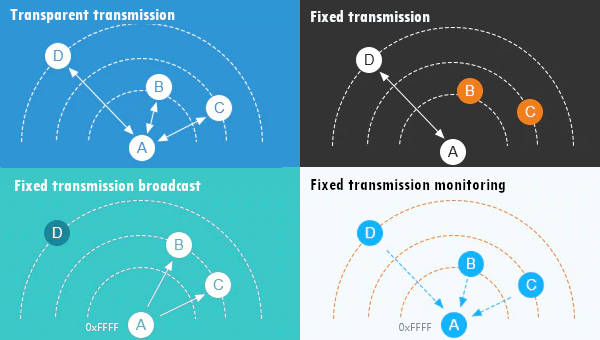
LoRa E22 transmitting scenarios, lines are channels
Fixed transmission have more scenarios

LoRa E22 transmitting scenarios, lines are channels
## Thanks
Now you have all information to do your work, but I think It’s important to show some realistic examples to undestand better all the possibility.
- Ebyte LoRa E22 device for Arduino, esp32 or esp8266: settings and basic usage
- Ebyte LoRa E22 device for Arduino, esp32 or esp8266: library
- Ebyte LoRa E22 device for Arduino, esp32 or esp8266: configuration
- Ebyte LoRa E22 device for Arduino, esp32 or esp8266: fixed transmission and RSSI
- Ebyte LoRa E22 device for Arduino, esp32 or esp8266: power saving and sending structured data
- Ebyte LoRa E22 device for Arduino, esp32 or esp8266: repeater mode and remote settings
- Ebyte LoRa E22 device for Arduino, esp32 or esp8266: WOR microcontroller and Arduino shield
- Ebyte LoRa E22 device for Arduino, esp32 or esp8266: WOR microcontroller and WeMos D1 shield
- Ebyte LoRa E22 device for Arduino, esp32 or esp8266: WOR microcontroller and esp32 dev v1 shield
-




