# Python Document Scanner SDK
The project is a Python binding to [Dynamsoft C/C++ Document Scanner SDK](https://www.dynamsoft.com/document-normalizer/docs/introduction/?ver=latest). It aims to help developers quickly build desktop document scanner applications in Python on Windows and Linux.
## About Dynamsoft Document Scanner
Get a [30-day FREE trial license](https://www.dynamsoft.com/customer/license/trialLicense?product=ddn) to activate the SDK.
## Supported Python Edition
* Python 3.x
## Dependencies
```bash
pip install opencv-python
```
## Command-line Usage
```bash
# Scan documents from images
$ scandocument -f <file-name> -l <license-key>
# Scan documents from camera video stream
$ scandocument -c 1 -l <license-key>
```
## Quick Start
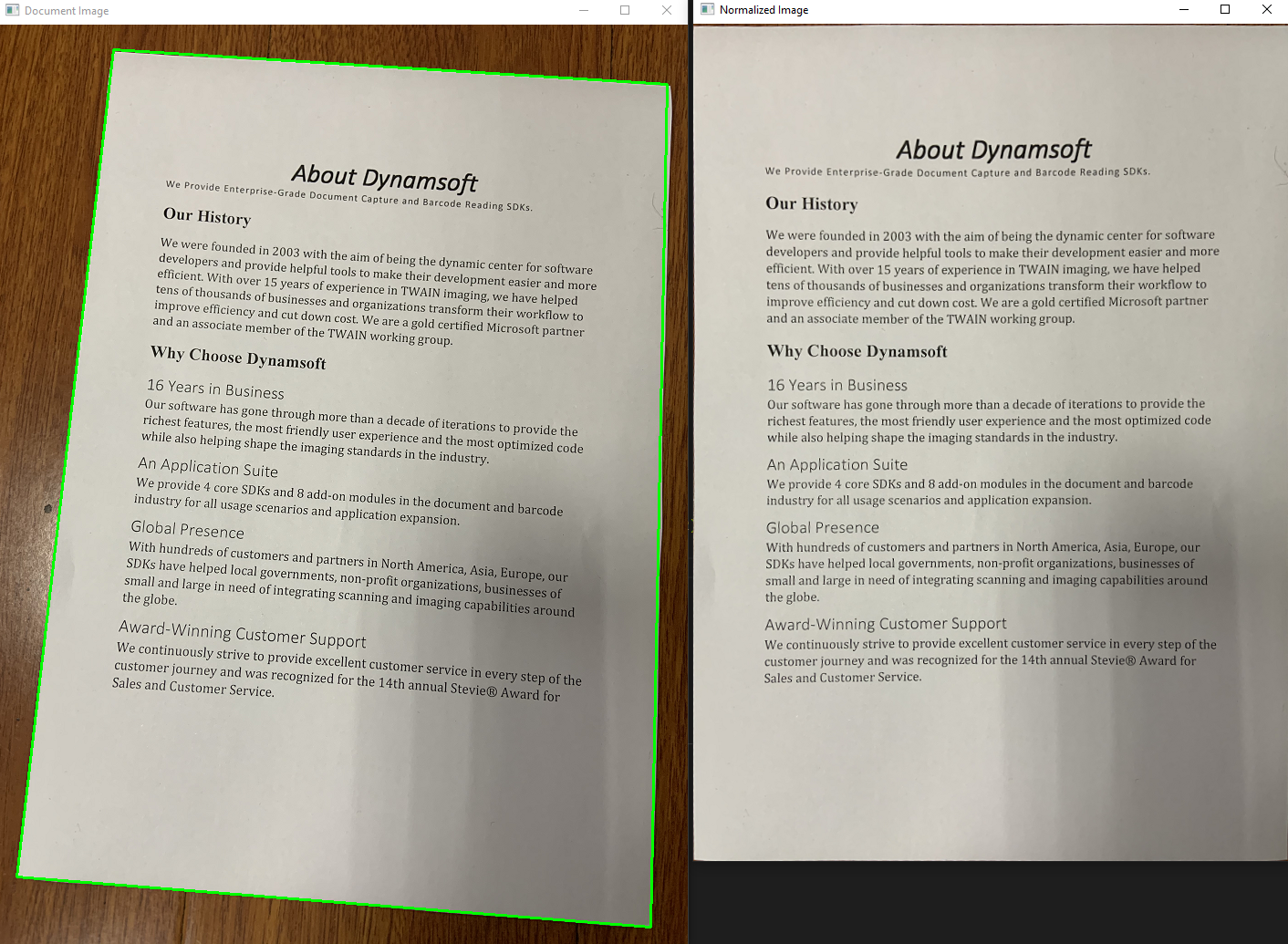
- Scan documents from an image file:
```python
import argparse
import docscanner
import sys
import numpy as np
import cv2
import time
def showNormalizedImage(name, normalized_image):
mat = docscanner.convertNormalizedImage2Mat(normalized_image)
cv2.imshow(name, mat)
return mat
def process_file(filename, scanner):
image = cv2.imread(filename)
results = scanner.detectMat(image)
for result in results:
x1 = result.x1
y1 = result.y1
x2 = result.x2
y2 = result.y2
x3 = result.x3
y3 = result.y3
x4 = result.x4
y4 = result.y4
normalized_image = scanner.normalizeBuffer(image, x1, y1, x2, y2, x3, y3, x4, y4)
showNormalizedImage("Normalized Image", normalized_image)
cv2.drawContours(image, [np.int0([(x1, y1), (x2, y2), (x3, y3), (x4, y4)])], 0, (0, 255, 0), 2)
cv2.imshow('Document Image', image)
cv2.waitKey(0)
normalized_image.save(str(time.time()) + '.png')
print('Image saved')
def scandocument():
"""
Command-line script for scanning documents from a given image
"""
parser = argparse.ArgumentParser(description='Scan documents from an image file')
parser.add_argument('-f', '--file', help='Path to the image file')
parser.add_argument('-l', '--license', default='', type=str, help='Set a valid license key')
args = parser.parse_args()
# print(args)
try:
filename = args.file
license = args.license
if filename is None:
parser.print_help()
return
# set license
if license == '':
docscanner.initLicense("DLS2eyJoYW5kc2hha2VDb2RlIjoiMjAwMDAxLTE2NDk4Mjk3OTI2MzUiLCJvcmdhbml6YXRpb25JRCI6IjIwMDAwMSIsInNlc3Npb25QYXNzd29yZCI6IndTcGR6Vm05WDJrcEQ5YUoifQ==")
else:
docscanner.initLicense(license)
# initialize mrz scanner
scanner = docscanner.createInstance()
ret = scanner.setParameters(docscanner.Templates.color)
if filename is not None:
process_file(filename, scanner)
except Exception as err:
print(err)
sys.exit(1)
scandocument()
```
- Scan documents from camera video stream:
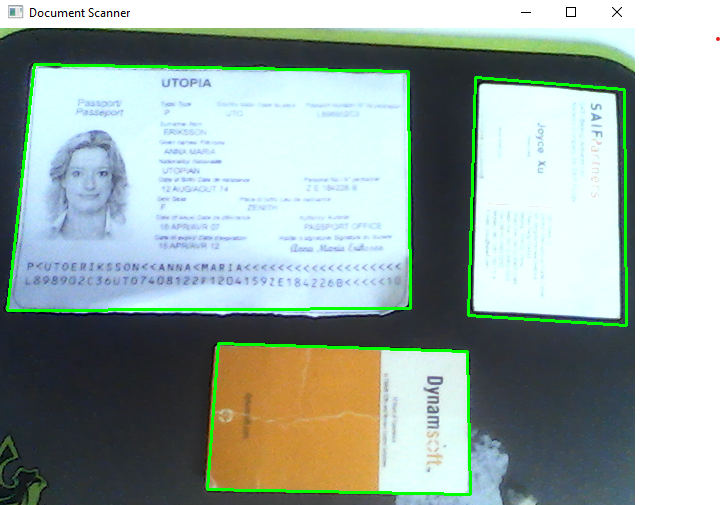
```python
import argparse
import docscanner
import sys
import numpy as np
import cv2
import time
g_results = None
g_normalized_images = []
def callback(results):
global g_results
g_results = results
def showNormalizedImage(name, normalized_image):
mat = docscanner.convertNormalizedImage2Mat(normalized_image)
cv2.imshow(name, mat)
return mat
def process_video(scanner):
scanner.addAsyncListener(callback)
cap = cv2.VideoCapture(0)
while True:
ret, image = cap.read()
ch = cv2.waitKey(1)
if ch == 27:
break
elif ch == ord('n'): # normalize image
if g_results != None:
g_normalized_images = []
index = 0
for result in g_results:
x1 = result.x1
y1 = result.y1
x2 = result.x2
y2 = result.y2
x3 = result.x3
y3 = result.y3
x4 = result.x4
y4 = result.y4
normalized_image = scanner.normalizeBuffer(image, x1, y1, x2, y2, x3, y3, x4, y4)
g_normalized_images.append((str(index), normalized_image))
mat = showNormalizedImage(str(index), normalized_image)
index += 1
elif ch == ord('s'): # save image
for data in g_normalized_images:
# cv2.imwrite('images/' + str(time.time()) + '.png', image)
cv2.destroyWindow(data[0])
data[1].save(str(time.time()) + '.png')
print('Image saved')
g_normalized_images = []
if image is not None:
scanner.detectMatAsync(image)
if g_results != None:
for result in g_results:
x1 = result.x1
y1 = result.y1
x2 = result.x2
y2 = result.y2
x3 = result.x3
y3 = result.y3
x4 = result.x4
y4 = result.y4
cv2.drawContours(image, [np.int0([(x1, y1), (x2, y2), (x3, y3), (x4, y4)])], 0, (0, 255, 0), 2)
cv2.putText(image, 'Press "n" to normalize image', (10, 30), cv2.FONT_HERSHEY_SIMPLEX, 0.8, (0, 0, 255), 2)
cv2.putText(image, 'Press "s" to save image', (10, 60), cv2.FONT_HERSHEY_SIMPLEX, 0.8, (0, 0, 255), 2)
cv2.putText(image, 'Press "ESC" to exit', (10, 90), cv2.FONT_HERSHEY_SIMPLEX, 0.8, (0, 0, 255), 2)
cv2.imshow('Document Scanner', image)
def scandocument():
"""
Command-line script for scanning documents from camera video stream.
"""
parser = argparse.ArgumentParser(description='Scan documents from camera')
parser.add_argument('-c', '--camera', default=False, type=bool, help='Whether to show the image')
parser.add_argument('-l', '--license', default='', type=str, help='Set a valid license key')
args = parser.parse_args()
# print(args)
try:
license = args.license
camera = args.camera
if camera is False:
parser.print_help()
return
# set license
if license == '':
docscanner.initLicense("DLS2eyJoYW5kc2hha2VDb2RlIjoiMjAwMDAxLTE2NDk4Mjk3OTI2MzUiLCJvcmdhbml6YXRpb25JRCI6IjIwMDAwMSIsInNlc3Npb25QYXNzd29yZCI6IndTcGR6Vm05WDJrcEQ5YUoifQ==")
else:
docscanner.initLicense(license)
# initialize mrz scanner
scanner = docscanner.createInstance()
ret = scanner.setParameters(docscanner.Templates.color)
if camera is True:
process_video(scanner)
except Exception as err:
print(err)
sys.exit(1)
scandocument()
```
## Methods
- `docscanner.initLicense('YOUR-LICENSE-KEY')` # set the license key
```python
docscanner.initLicense("DLS2eyJoYW5kc2hha2VDb2RlIjoiMjAwMDAxLTE2NDk4Mjk3OTI2MzUiLCJvcmdhbml6YXRpb25JRCI6IjIwMDAwMSIsInNlc3Npb25QYXNzd29yZCI6IndTcGR6Vm05WDJrcEQ5YUoifQ==")
```
- `docscanner.createInstance()` # create a Document Scanner instance
```python
scanner = docscanner.createInstance()
```
- `detectFile(filename)` # do edge detection from an image file
```python
results = scanner.detectFile(<filename>)
```
- `detectMat(Mat image)` # do edge detection from Mat
```python
image = cv2.imread(<filename>)
results = scanner.detectMat(image)
for result in results:
x1 = result.x1
y1 = result.y1
x2 = result.x2
y2 = result.y2
x3 = result.x3
y3 = result.y3
x4 = result.x4
y4 = result.y4
```
- `setParameters(Template)` # Select color, binary or grayscale template
```python
scanner.setParameters(docscanner.Templates.color)
```
- `addAsyncListener(callback function)` # start a native thread to run document scanning tasks
- `detectMatAsync(<opencv mat data>)` # put a document scanning task into the native queue
```python
def callback(results):
for result in results:
print(result.x1)
print(result.y1)
print(result.x2)
print(result.y2)
print(result.x3)
print(result.y3)
print(result.x4)
print(result.y4)
import cv2
image = cv2.imread(<filename>)
scanner.addAsyncListener(callback)
scanner.detectMatAsync(image)
sleep(5)
```
- `normalizeBuffer(mat, x1, y1, x2, y2, x3, y3, x4, y4)` # do perspective correction from Mat
```python
normalized_image = scanner.normalizeBuffer(image, x1, y1, x2, y2, x3, y3, x4, y4)
```
- `normalizeFile(filename, x1, y1, x2, y2, x3, y3, x4, y4)` # do perspective correction from a file
```python
normalized_image = scanner.normalizeFile(<filename>, x1, y1, x2, y2, x3, y3, x4, y4)
```
- `normalized_image.save(filename)` # save the normalized image to a file
```python
normalized_image.save(<filename>)
```
- `normalized_image.recycle()` # release the memory of the normalized image
- `clearAsyncListener()` # stop the native thread and clear the registered Python function
## C/C++ API
To customize Python API based on C/C++, please refer to the
[online documentation](https://www.dynamsoft.com/document-normalizer/docs/programming/c/api-reference/?ver=latest).
## How to Build the Python Document Scanner Extension
- Create a source distribution:
```bash
python setup.py sdist
```
- setuptools:
```bash
python setup_setuptools.py build
python setup_setuptools.py develop
```
- Build wheel:
```bash
pip wheel . --verbose
# Or
python setup.py bdist_wheel
```




