
# Installation
Install latest via pip:
`pip install discord-menu`
# What is discord-menu?
discord-menu is a flexible python framework for creating interactive menus out of Discord Embeds. Users can click specified emojis and the embed responds according to preset instructions.
Its primary features are:
1. **Declaritive UI Syntax** - React/SwiftUI like definition of Views.
1. **Stateless compute** - Menus do not require maintaining a session and no data needs to be stored on the bot's server.
1. **Event driven** - No polling needed and interactions respond immediately to input.
1. **Scalable state** - Message state is managed directly in the Embed, leveraging Discord's storage scalability.
1. **Flexibility** - Arbitrary code can be executed on emoji clicks, allowing for complex features like pagination, child menus, or user authorizaton!
# How to use
Example code demonstrated with Red-DiscordBot. Raw discord.py should also work with slight modification of imports.
# Supported convenience menus
1. **SimpleTextMenu** - Use this if you just want to display some text.
1. **SimpleTabbedTextMenu** - This is useful if you a few different panes of text content that a user would select between.
1. **ClosableMenu** - Write a custom view (more than just text) with a close button.
1. **TabbedMenu** - Write custom views, and tab between them using dedicated emojis. Closable by default.
1. **ScrollableMenu** - Write custom views, and scroll between them using left and right arrows. Closable by default.
## SimpleTextMenu
```python
import discord
from redbot.core import commands
from discordmenu.menu.listener.menu_listener import MenuListener
from discordmenu.menu.listener.menu_map import MenuMap, MenuMapEntry
from discordmenu.menu.simple_text_menu import SimpleTextMenu, SimpleTextViewState
menu_map = MenuMap()
menu_map[SimpleTextMenu.MENU_TYPE] = MenuMapEntry(SimpleTextMenu, EmbedTransitions)
class TestCog(commands.Cog):
def __init__(self, bot):
self.listener = MenuListener(bot, menu_map)
@commands.Cog.listener('on_raw_reaction_add')
@commands.Cog.listener('on_raw_reaction_remove')
async def on_raw_reaction_update(self, payload: discord.RawReactionActionEvent):
await self.listener.on_raw_reaction_update(payload)
async def simplemenu(self, ctx):
await SimpleTextMenu.menu().create(ctx, SimpleTextViewState("Hello World!"))
```
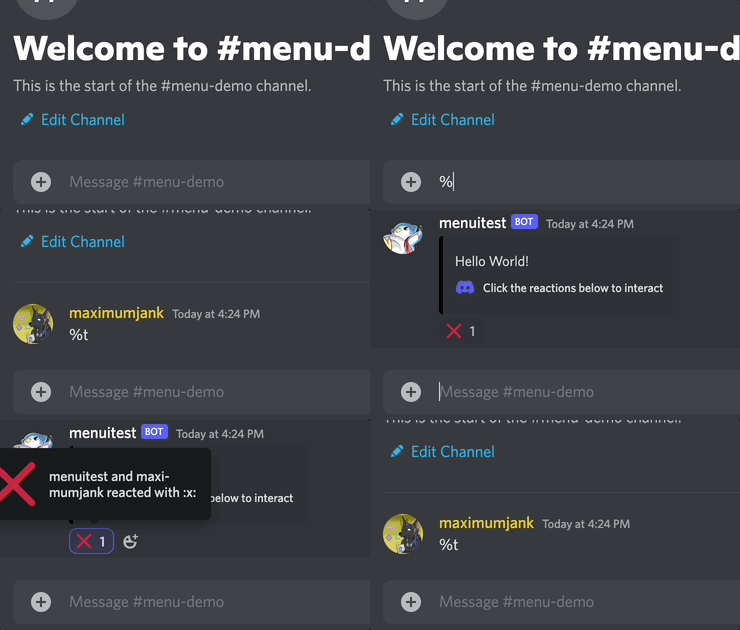
[Code](https://github.com/TsubakiBotPad/discord-menu/blob/main/test/testcog/main.py#L38)
## SimpleTabbedTextMenu
```python
import discord
from redbot.core import commands
from discordmenu.menu.listener.menu_listener import MenuListener
from discordmenu.menu.listener.menu_map import MenuMap, MenuMapEntry
from discordmenu.menu.simple_tabbed_text_menu import SimpleTabbedTextMenu, SimpleTabbedTextMenuTransitions,
SimpleTabbedTextViewState
menu_map = MenuMap()
menu_map[SimpleTabbedTextMenu.MENU_TYPE] = MenuMapEntry(SimpleTabbedTextMenu, SimpleTabbedTextMenuTransitions)
class TestCog(commands.Cog):
def __init__(self, bot):
self.listener = MenuListener(bot, menu_map)
@commands.Cog.listener('on_raw_reaction_add')
@commands.Cog.listener('on_raw_reaction_remove')
async def on_raw_reaction_update(self, payload: discord.RawReactionActionEvent):
await self.listener.on_raw_reaction_update(payload)
async def simpletabbedtextmenu(self, ctx):
vs = SimpleTabbedTextViewState("Initial message.", ["Message 1", "Message 2", "Message 3"])
await SimpleTabbedTextMenu.menu().create(ctx, vs)
```
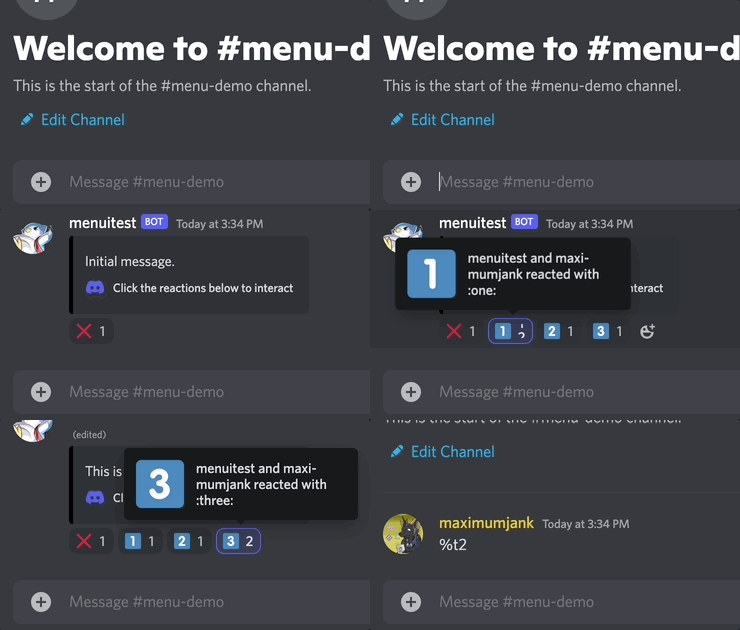
[Code](https://github.com/TsubakiBotPad/discord-menu/blob/main/test/testcog/main.py#L43)
## Sample code for other menus
For example code for `ClosableMenu`, `TabbedMenu`, or `ScrollableMenu`, refer to the [test file](https://github.com/TsubakiBotPad/discord-menu/blob/main/test/testcog/main.py).
## Advanced usage
If you're looking for ideas on what you can do with this framework, or for info on how to create complex menus, refer to [documentation on advanced usage](https://github.com/TsubakiBotPad/discord-menu/blob/main/docs/advanced-usage.md).
This menu system is originally built for looking up data from the popular puzzle gacha game [Puzzle & Dragons](https://en.wikipedia.org/wiki/Puzzle_%26_Dragons) - feel free to join the [discord server](https://discord.gg/QCRxNtC) for a demo on the complex system that powers data accessbility within the community.
# Running tests + sample code
## Prerequisite: Create a Discord bot
If you don't have one already, follow the instructions to create a bot in Red's official documentation:
[Creating a bot account](https://docs.discord.red/en/stable/bot_application_guide.html#creating-a-bot-account)
Keep the bot `token` that you get from Discord at the end of the instructions handy - you will need it to set up the bot later.
## Installation
1. Create a python 3 venv in the `test` folder. `virtualenv -p python3 <envname>`
1. Activate the venv.
1. `pip install -r requirements.txt`
The above steps install Red-Discord bot framework. You can now follow more detailed [instructions](https://docs.discord.red/en/stable/install_guides/mac.html#setting-up-and-running-red) to startup the bot. Or run these in command line and follow the prompts:
- `redbot-setup`
- `redbot <bot_name>`
## Interact with the bot
The rest of the guide takes place from inside Discord. Replace `^` with your prefix to talk to your bot.
1. Once the bot is launched, set it to the `test` directory as a cog path.
```
^addpath /Users/me/src/discord-menu/test
```
1. Load `testcog`
```
^reload testcog
```
1. Run a test command. Test [code](https://github.com/TsubakiBotPad/discord-menu/blob/main/test/testcog/main.py#L37) for simplemenu.
```
^t
```

# Contributing
If you encounter a bug or would like to make a feature request, please file a Github issue or submit a pull request.
Also, if you don't understand something in the documentation, you are experiencing problems, or you just need a gentle nudge in the right direction, please don't hesitate to join the [discord server](https://discord.gg/QCRxNtC).




