# Slowly Changing Dimensions implementation with Azure Databricks Delta Lake
[](https://pypi.org/project/dbxscd)
## Installation
Install dbxscd package in Azure Databricks notebook
```shell
%pip install dbxscd
```
## Run Example
- [Create Azure Databricks Workspace](https://docs.microsoft.com/en-us/azure/databricks/scenarios/quickstart-create-databricks-workspace-portal?tabs=azure-portal)
- Import [example.py](https://raw.githubusercontent.com/maye-msft/SlowlyChangingDimensionsInDeltaLake/main/src/dbxscd/example.py) into workspace
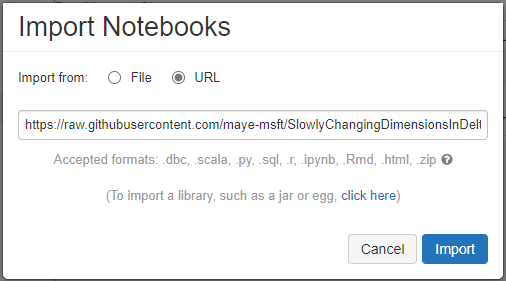
- Click "Run All" button
## What is Slowly Changing Dimension
Slowly Changing Dimensions (SCD) are dimensions which change over time and in Data Warehouse we need to track the changes of the attributes keep the accuracy of the report.
And typically there are three types of SCD
- Type 1: SCD1, No history preservation
- Type 2: SCD2, Unlimited history preservation and new rows
- Type 3: SCD3, Limited history preservation
For example we have a dataset
ShortName | Fruit | Color | Price
--------- | ----- | ----- | -----
FA | Fiji Apple | Red | 3.6
BN | Banana | Yellow | 1
GG | Green Grape | Green | 2
RG | Red Grape | Red | 2
If we change the price of "Fiji Apple" into 3.5, the dataset will be
with SCD1:
ShortName | Fruit | Color | Price
--------- | ----- | ----- | -----
FA | Fiji Apple | Red | 3.5
BN | Banana | Yellow | 1
GG | Green Grape | Green | 2
RG | Red Grape | Red | 2
with SCD2:
ShortName | Fruit | Color | Price | is_last
--------- | ----- | ----- | ----- | -------
FA | Fiji Apple | Red | 3.5 | Y
FA | Fiji Apple | Red | 3.6 | N
BN | Banana | Yellow | 1 | Y
GG | Green Grape | Green | 2 | Y
RG | Red Grape | Red | 2 | Y
with SCD3:
ShortName | Fruit | Color | Price | Color_old | Price_old
--------- | ----- | ----- | ----- | --------- | ---------
FA | Fiji Apple | Red | 3.5 | Red | 3.6
BN | Banana | Yellow | 1 | NULL | NULL
GG | Green Grape | Green | 2 | NULL | NULL
RG | Red Grape | Red | 2 | NULL | NULL
## SCD implementation in Databricks
In this repository, there are [implementations](./src/dbxscd/__init__.py) of SCD1, SCD2 and SCD3 in python and Databricks Delta Lake.
1. SCD1
```python
dbxscd.SCD1(spark, df, target_table_name, target_partition_keys, key_cols, current_time):
```
Parameters:
- spark: instance of spark session
- df: source data frame
- target_table_name: target table name
- target_partition_keys: partition key of the target table
- key_cols: columns of the key for each row
- current_time: current timestamp
Here is the code to show an example of SCD1
```python
from pyspark.sql import functions as F
from pyspark.sql import DataFrame
import datetime
# create sample dataset
df1 = spark.createDataFrame([('FA', 'Fiji Apple', 'Red', 3.5)
,('BN', 'Banana', 'Yellow', 1.0)
,('GG', 'Green Grape', 'Green', 2.0)
,('RG', 'Red Grape', 'Red', 2.0)],
['ShortName','Fruit', 'Color', 'Price'])
# prepare parameters
current_time = datetime.datetime.now().strftime("%Y-%m-%dT%H:%M:%S")
target_partition_keys = ['ShortName']
key_cols = "ShortName,Fruit"
target_table_name_scd1 = 'default.table_scd1'
# call the SCD1 function
dbxscd.SCD1(spark, df1, target_table_name_scd1, target_partition_keys, key_cols, current_time)
# display the result
display(spark.sql(f"select * from {target_table_name_scd1}"))
```

Change the price of "Fiji Apple" into 3.5 and run SCD1 again
```python
df2 = spark.createDataFrame([('FA', 'Fiji Apple', 'Red', 3.6)
,('BN', 'Banana', 'Yellow', 1.0)
,('GG', 'Green Grape', 'Green', 2.0)
,('RG', 'Red Grape', 'Red', 2.0)],
['ShortName','Fruit', 'Color', 'Price'])
# call the SCD1 function again
dbxscd.SCD1(spark, df2, target_table_name_scd1, target_partition_keys, key_cols, current_time)
display(spark.sql(f"select * from {target_table_name_scd1}"))
```

1. SCD2
```python
dbxscd.SCD2(spark, df, target_table_name, target_partition_keys, key_cols, current_time):
```
Parameters:
- spark: instance of spark session
- df: source data frame
- target_table_name: target table name
- target_partition_keys: partition key of the target table
- key_cols: columns of the key for each row
- current_time: current timestamp
Here is the code to show an example of SCD2
```python
from pyspark.sql import functions as F
from pyspark.sql import DataFrame
import datetime
# create sample dataset
df1 = spark.createDataFrame([('FA', 'Fiji Apple', 'Red', 3.5)
,('BN', 'Banana', 'Yellow', 1.0)
,('GG', 'Green Grape', 'Green', 2.0)
,('RG', 'Red Grape', 'Red', 2.0)],
['ShortName','Fruit', 'Color', 'Price'])
# prepare parameters
current_time = datetime.datetime.now().strftime("%Y-%m-%dT%H:%M:%S")
target_partition_keys = ['ShortName']
key_cols = "ShortName,Fruit"
target_table_name_scd2 = 'default.table_scd2'
# call the SCD1 function
dbxscd.SCD2(spark, df1, target_table_name_scd1, target_partition_keys, key_cols, current_time)
# display the result
display(spark.sql(f"select * from {target_table_name_scd2}"))
```

Change the price of "Fiji Apple" into 3.5 and run SCD2 again
```python
df2 = spark.createDataFrame([('FA', 'Fiji Apple', 'Red', 3.6)
,('BN', 'Banana', 'Yellow', 1.0)
,('GG', 'Green Grape', 'Green', 2.0)
,('RG', 'Red Grape', 'Red', 2.0)],
['ShortName','Fruit', 'Color', 'Price'])
# call the SCD1 function again
dbxscd.SCD2(spark, df2, target_table_name_scd2, target_partition_keys, key_cols, current_time)
display(spark.sql(f"select * from {target_table_name_scd2}"))
```

1. SCD3
```python
dbxscd.SCD3(spark, df, target_table_name, target_partition_keys, key_cols, current_time):
```
Parameters:
- spark: instance of spark session
- df: source data frame
- target_table_name: target table name
- target_partition_keys: partition key of the target table
- key_cols: columns of the key for each row
- current_time: current timestamp
Here is the code to show an example of SCD3
```python
from pyspark.sql import functions as F
from pyspark.sql import DataFrame
import datetime
# create sample dataset
df1 = spark.createDataFrame([('FA', 'Fiji Apple', 'Red', 3.5)
,('BN', 'Banana', 'Yellow', 1.0)
,('GG', 'Green Grape', 'Green', 2.0)
,('RG', 'Red Grape', 'Red', 2.0)],
['ShortName','Fruit', 'Color', 'Price'])
# prepare parameters
current_time = datetime.datetime.now().strftime("%Y-%m-%dT%H:%M:%S")
target_partition_keys = ['ShortName']
key_cols = "ShortName,Fruit"
target_table_name_scd3 = 'default.table_scd3'
# call the SCD3 function
dbxscd.SCD3(spark, df1, target_table_name_scd3, target_partition_keys, key_cols, current_time)
# display the result
display(spark.sql(f"select * from {target_table_name_scd3}"))
```

Change the price of "Fiji Apple" into 3.5 and run SCD3 again
```python
df2 = spark.createDataFrame([('FA', 'Fiji Apple', 'Red', 3.6)
,('BN', 'Banana', 'Yellow', 1.0)
,('GG', 'Green Grape', 'Green', 2.0)
,('RG', 'Red Grape', 'Red', 2.0)],
['ShortName','Fruit', 'Color', 'Price'])
# call the SCD1 function again
dbxscd.SCD3(spark, df2, target_table_name_scd3, target_partition_keys, key_cols, current_time)
display(spark.sql(f"select * from {target_table_name_scd3}"))
```





