# CSSFinder
Closest separable state finder.
## Installing
To install CSSFinder from PyPI, use `pip` in terminal:
```
pip install cssfinder
```
Because CSSFinder is a modular tool, you will have to also install a `backend`
package, which contains concrete implementation of algorithms. Simples way is
to just install `numpy` or `rust` extras set:
```
pip install cssfinder[numpy]
```
```
pip install cssfinder[rust]
```
You don't need both, one will be perfectly fine. Alternatively, you may find
`cssfinder-backend-numpy` and `cssfinder-backend-rust` on PyPI and install them
manually, with exact same effect. Backends are dynamically detected from all
locations, Python can import modules, thus any valid way of making backend code
reachable for interpreter will work.
If you want to use development version, traverse `Development` and `Packaging`
sections below.
### But there is a catch!
CSSFinder can export PDF reports (and other formats too), but it uses
`weasyprint` for that and `weasyprint` relies on `GTK3`. Unfortunately it is
quite hard to get `GTK3` going on windows and `weasyprint` requires it to work.
Therefore you must handle installation yourself.
[Here](https://doc.courtbouillon.org/weasyprint/stable/first_steps.html#windows)
you can find official guidelines from `weasyprint`.
[This repository](https://github.com/tschoonj/GTK-for-Windows-Runtime-Environment-Installer)
may also help. Alternatively you can use WSL to install and run CSSFinder, as
its seamless to do that.
Its worth mentioning that other formats are not affected by this issue.
## Examples
Fortunately for all newcomers, CSSFinders comes in with some example projects,
which may come in handy while starting to describe your first project.
List of examples available with CSSFinder can be obtained with command:
```
cssfinder examples list
```
Afterwards you should be presented with table, within console window, similar
to this one:
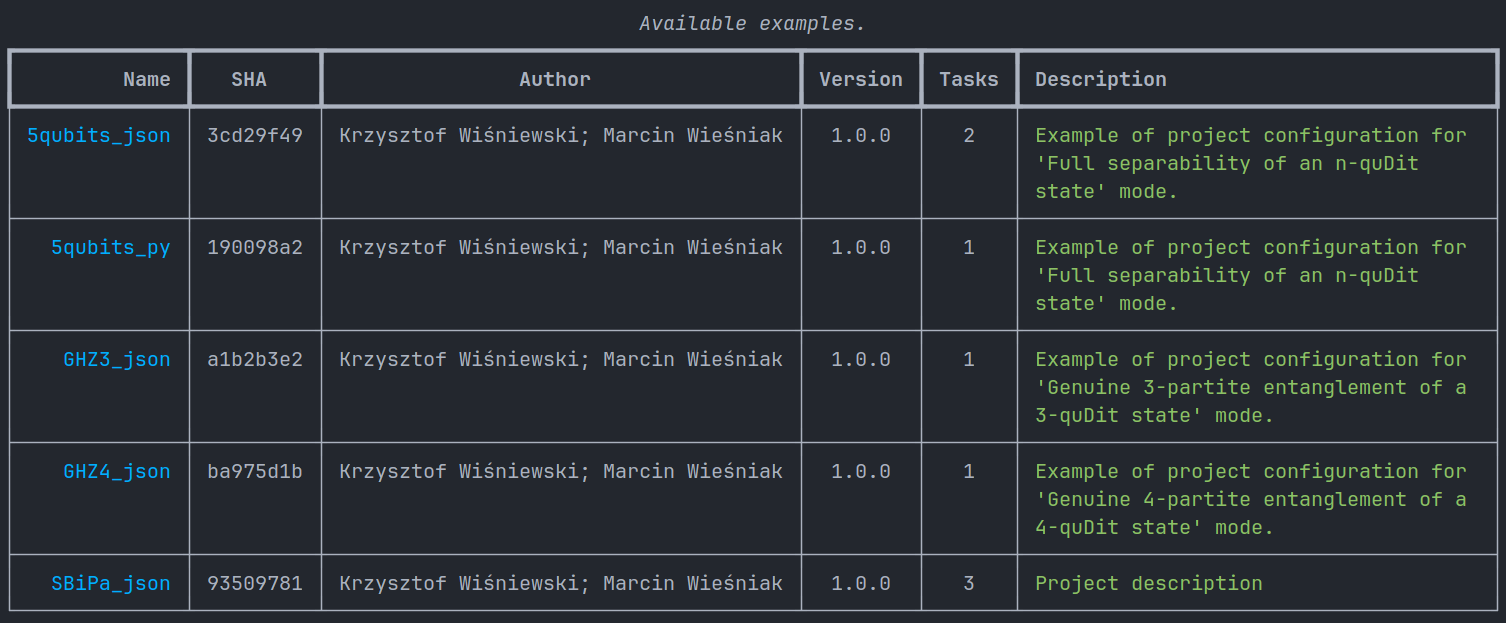
For sake of example, let's assume that name `5qubits_json` caught our eye, and
now we are willing to spend some of our precious time diving deeper into what's
inside. To do that, we have to clone this example somewhere with following
command:
```
cssfinder examples clone --name 5qubits_json
```
> This command, similarly to all other commands of all other CSSFinder
> commands, can be used with `--help` flag to inspect possible invocation
> parameters.
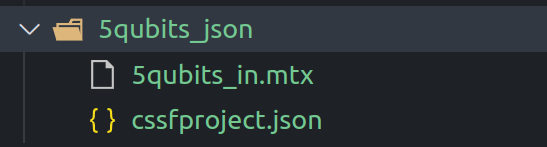
As result, you should find `5qubits_json` directory have been created in your
current working directory.
> Example `5qubits_json` relies on `numpy` backend, make sure to install it, if
> you haven't done it before.
Now we can proceed with running tasks defined within the project. That can be
achieved with following command:
```
cssfinder project -p ./5qubits_json/ task run
```
This command will run all tasks, which may take something in between of few
seconds and few minutes, depending on your hardware.
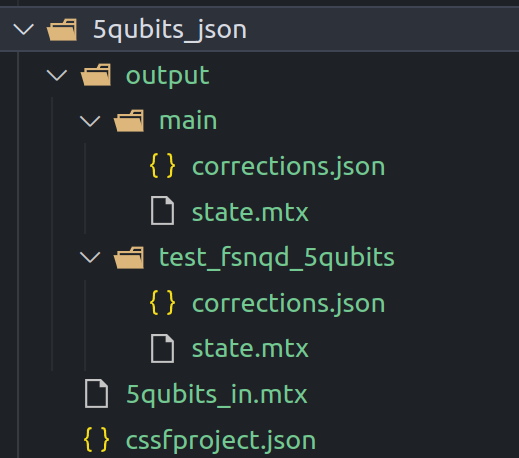
Result of calculations can be inspected in `output/` directory in project
folder (`5qubits_json/`).
## Development
This project uses `Python` programming language and requires at least python
`3.8` for development and distribution. Development dependencies
[`poetry`](https://pypi.org/project/poetry/) for managing dependencies and
distribution building. It is necessary to perform any operations in development
environment.
To install poetry globally (preferred way) use `pip` in terminal:
```
pip install poetry
```
Then use
```
poetry shell
```
to spawn new shell with virtual environment activated. Virtual environment will
be indicated by terminal prompt prefix `(cssfinder-py3.10)`, version indicated
in prefix depends on used version of Python interpreter. It is not necessary to
use Python 3.10, however at least 3.8 is required.
Within shell with active virtual environment use:
```
poetry install --sync
```
To install all dependencies. Every time you perform a `git pull` or change a
branch, you should call this command to make sure you have the correct versions
of dependencies.
Last line should contain something like:
```
Installing the current project: cssfinder (0.1.0)
```
If no error messages are shown, You are good to go.
## Packaging
A Python Wheel is a built package format for Python that can be easily
installed and distributed, containing all the files necessary to install a
module and can be installed with pip with all dependencies automatically
installed too.
To create wheel of cssfinder use `poe` task in terminal:
```
poe build
```

This will create `dist/` directory with `cssfinder-0.6.0` or alike inside.
Wheel file can be installed with
```
pip install ./dist/cssfinder-0.6.0
```
What you expect is
```
Successfully installed cssfinder-0.6.0
```
or rather something like
```
Successfully installed click-8.1.3 contourpy-1.0.7 cssfinder-0.6.0 cycler-0.11.0 dnspython-2.3.0 email-validator-1.3.1 fonttools-4.39.0 idna-3.4 jsonref-1.1.0 kiwisolver-1.4.4 llvmlite-0.39.1 markdown-it-py-2.2.0 matplotlib-3.7.1 mdurl-0.1.2 numba-0.56.4 numpy-1.23.5 packaging-23.0 pandas-1.5.3 pendulum-2.1.2 pillow-9.4.0 pydantic-1.10.5 pygments-2.14.0 pyparsing-3.0.9 python-dateutil-2.8.2 pytz-2022.7.1 pytzdata-2020.1 rich-13.3.2 scipy-1.10.1 six-1.16.0 typing-extensions-4.5.0
```
But `cssfinder-0.6.0` should be included in this list.
## Code quality
To ensure that all code follow same style guidelines and code quality rules,
multiple static analysis tools are used. For simplicity, all of them are
configured as `pre-commit` ([learn about pre-commit](https://pre-commit.com/))
hooks. Most of them however are listed as development dependencies.
- `autocopyright`: This hook automatically adds copyright headers to files. It
is used to ensure that all files in the repository have a consistent
copyright notice.
- `autoflake`: This hook automatically removes unused imports from Python code.
It is used to help keep code clean and maintainable by removing unnecessary
code.
- `docformatter`: This hook automatically formats docstrings in Python code. It
is used to ensure that docstrings are consistent and easy to read.
- `prettier`: This hook automatically formats code in a variety of languages,
including JavaScript, HTML, CSS, and Markdown. It is used to ensure that code
is consistently formatted and easy to read.
- `isort`: This hook automatically sorts Python imports. It is used to ensure
that imports are organized in a consistent and readable way.
- `black`: This hook automatically formats Python code. It is used to ensure
that code is consistently formatted and easy to read.
- `check-merge-conflict`: This hook checks for merge conflicts. It is used to
ensure that code changes do not conflict with other changes in the
repository.
- `check-case-conflict`: This hook checks for case conflicts in file names. It
is used to ensure that file names are consistent and do not cause issues on
case-sensitive file systems.
- `trailing-whitespace`: This hook checks for trailing whitespace in files. It
is used to ensure that files do not contain unnecessary whitespace.
- `end-of-file-fixer`: This hook adds a newline to the end of files if one is
missing. It is used to ensure that files end with a newline character.
- `debug-statements`: This hook checks for the presence of debugging statements
(e.g., print statements) in code. It is used to ensure that code changes do
not contain unnecessary debugging code.
- `check-added-large-files`: This hook checks for large files that have been
added to the repository. It is used to ensure that large files are not
accidentally committed to the repository.
- `check-toml`: This hook checks for syntax errors in TOML files. It is used to
ensure that TOML files are well-formed.
- `mixed-line-ending`: This hook checks for mixed line endings (e.g., a mix of
Windows and Unix line endings) in text files. It is used to ensure that text
files have consistent line endings.
To run all checks, you must install hooks first with poe
```
poe install-hooks
```
After you have once used this command, you wont have to use it in this
environment. Then you can use
```
poe run-hooks
```
To run checks and automatic fixing. Not all issues can be automatically fixed,
some of them will require your intervention.
Successful hooks run should leave no Failed tasks:

Example of failed task:

Those hooks will be run also while you try to commit anything. If any tasks
fails, no commit will be created, instead you will be expected to fix errors
and add stage fixes. Then you may retry running `git commit`.
## Profiling
To run simple profiling, You can use following command:
```
python -mcProfile -o "#examples_profile_5qubits_prof.prof" "assets/profiling/5qubits_prof/cssfproject.py"
```
Then You can view output using [snakeviz](https://pypi.org/project/snakeviz/):
```
snakeviz "#examples_profile_5qubits_prof.prof"
```
## Command Line Interface
The `CSSFinder` is a script that finds the closest separable states. The script
offers a command-line interface that allows you to execute different tasks
related to your CSSFinder project. This documentation will provide a summary of
the commands and options available.
Once you have installed CSSFinder, you can use it from the command line:
`cssfinder [OPTIONS] COMMAND [ARGS]... `
You can run `cssfinder` without any arguments to display a help message.
## Options
The following options are available:
- `-v`, `--verbose`: increases the verbosity of logging messages. You can use
`-v` up to `-vvv` to increase the verbosity level.
- `--debug`: enables debug mode.
- `-V`, `--version`: shows the version number of CSSFinder and exits.
## Commands
The following commands are available:
### project
This command allows you to interact with a CSSFinder project. You need to
provide the path to your project as an argument.
#### run
This command runs all tasks in a CSSFinder project.
`cssfinder project run [OPTIONS] `
##### Options
- `-t`, `--tasks`: run specific tasks from the project. You can specify
multiple tasks by using this option multiple times.
#### task-report
This command generates a short report for a single task in a CSSFinder project.
`cssfinder project task-report TASK [OPTIONS] `
##### Arguments
- `TASK`: the name of the task to generate the report for.
##### Options
- `--html`, `--no-html`: include or exclude an HTML report in the generated
report.
- `--pdf`, `--no-pdf`: include or exclude a PDF report in the generated report.
- `--open`, `--no-open`: automatically open report in web browser.




