[](https://api.reuse.software/info/github.com/SAP/credential-digger)



# Credential Digger
Credential Digger is a GitHub scanning tool that identifies hardcoded credentials (Passwords, API Keys, Secret Keys, Tokens, personal information, etc), filtering the false positive data through machine learning models.
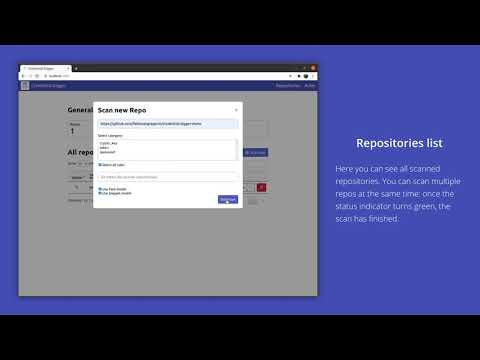
TLDR; watch the video ⬇️
[](https://www.youtube.com/watch?v=1qz8lYPrtMo)
- [Credential Digger](#credential-digger)
- [Why](#why)
- [Requirements](#requirements)
- [Download and Installation](#download-and-installation)
- [How to run](#how-to-run)
- [Add rules](#add-rules)
- [Scan a repository](#scan-a-repository)
- [Docker container](#docker-container)
- [Advanced Installation](#advanced-installation)
- [Build from source](#build-from-source)
- [External postgres database](#external-postgres-database)
- [How to update the project](#how-to-update-the-project)
- [Python library usage](#python-library-usage)
- [Add rules](#add-rules-1)
- [Scan a repository](#scan-a-repository-1)
- [CLI - Command Line Interface](#cli---command-line-interface)
- [pre-commit hook](#pre-commit-hook)
- [CI/CD Pipeline Intergation on Piper](#cicd-pipeline-intergation-on-piper)
- [Wiki](#wiki)
- [Contributing](#contributing)
- [How to obtain support](#how-to-obtain-support)
- [News](#news)
## Why
In data protection, one of the most critical threats is represented by hardcoded (or plaintext) credentials in open-source projects. Several tools are already available to detect leaks in open-source platforms, but the diversity of credentials (depending on multiple factors such as the programming language, code development conventions, or developers' personal habits) is a bottleneck for the effectiveness of these tools. Their lack of precision leads to a very high number of pieces of code incorrectly detected as leaked secrets. Data wrongly detected as a leak is called _false positive_ data, and compose the huge majority of the data detected by currently available tools.
The goal of Credential Digger is to reduce the amount of false positive data on the output of the scanning phase by leveraging machine learning models.
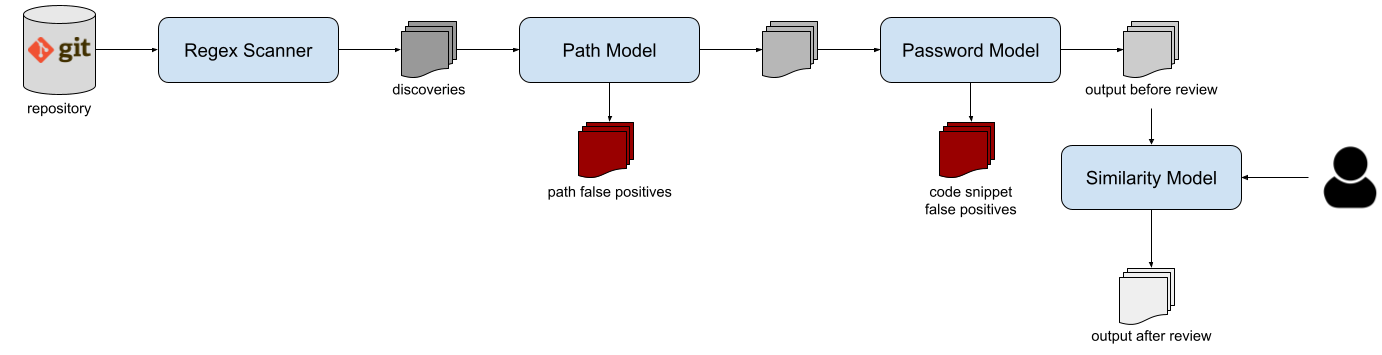
The tool supports several scan flavors: public and private repositories on
github and gitlab, wiki pages, github organizations, local git repositories, local files and folders.
Please refer to the [Wiki](https://github.com/SAP/credential-digger/wiki) for the complete documentation.
For the complete description of the approach of Credential Digger, [you can read this publication](https://www.scitepress.org/Papers/2021/102381/102381.pdf).
```
@InProceedings {lrnto-icissp21,
author = {S. Lounici and M. Rosa and C. M. Negri and S. Trabelsi and M. Önen},
booktitle = {Proc. of the 8th The International Conference on Information Systems Security and Privacy (ICISSP)},
title = {Optimizing Leak Detection in Open-Source Platforms with Machine Learning Techniques},
month = {February},
day = {11-13},
year = {2021}
}
```
## Requirements
Credential Digger supports Python >= 3.6 and < 3.10, and works only with Linux and MacOS systems.
In case you don't meet these requirements, you may consider running a [Docker container](#docker) (that also includes a user interface).
## Download and Installation
First, you need to install the regular expression matching library [Hyperscan](https://github.com/intel/hyperscan). Be sure to have `build-essential` and `python3-dev` too.
```bash
sudo apt install -y libhyperscan-dev build-essential python3-dev
```
or (for MacOS):
```bash
brew install hyperscan
```
Then, you can install Credential Digger module using `pip`.
```bash
pip install credentialdigger
```
## How to run
### Add rules
One of the core components of Credential Digger is the regular expression scanner. You can choose the regular expressions rules you want (just follow the template [here](https://github.com/SAP/credential-digger/blob/main/ui/backend/rules.yml)). We provide a list of patterns in the `rules.yml` file, that are included in the UI. The scanner supports rules of 4 different categories: `password`, `token`, `crypto_key`, and `other`.
**Before the very first scan, you need to add the rules that will be used by the scanner.** This step is only needed once.
```bash
credentialdigger add_rules --sqlite /path/to/data.db /path/to/rules.yaml
```
### Scan a repository
After adding the rules, you can scan a repository:
```bash
credentialdigger scan https://github.com/user/repo --sqlite /path/to/data.db
```
Machine learning models are not mandatory, but highly recommended in order to reduce the manual effort of reviewing the result of a scan:
```bash
credentialdigger scan https://github.com/user/repo --sqlite /path/to/data.db --models PathModel PasswordModel
```
As for the models, also the similarity feature is not mandatory, but highly recommended in order to reduce the manual effort while assessing the discoveries after a scan:
```bash
credentialdigger scan https://github.com/user/repo --sqlite /path/to/data.db --similarity --models PathModel PasswordModel
```
## Docker container
To have a ready-to-use instance of Credential Digger, with a user interface, you can build the docker container.
This option requires the installation of [Docker](https://docs.docker.com/engine/install/) and [Docker Compose](https://docs.docker.com/compose/install/).
```bash
git clone https://github.com/SAP/credential-digger.git
cd credential-digger
cp .env.sample .env
sudo docker-compose up --build
```
The UI is available at [http://localhost:5000/](http://localhost:5000/)
> It is preferrable to have at least 8 GB of RAM free when using docker containers
## Advanced Installation
Credential Digger is modular, and offers a wide choice of components and adaptations.
### Build from source
After installing the [dependencies](#install-dependencies) listed above, you can install Credential Digger as follows.
Configure a virtual environment for Python 3 (optional) and clone the main branch of the project:
```bash
virtualenv -p python3 ./venv
source ./venv/bin/activate
git clone https://github.com/SAP/credential-digger.git
cd credential-digger
```
Install the requirements from `requirements.txt` file and install the library:
```bash
pip install -r requirements.txt
python setup.py install
```
Then, you can add the rules and scan a repository as described above.
### External postgres database
Another ready-to-use instance of Credential Digger with the UI, but using a dockerized postgres database instead of a local sqlite one:
```bash
git clone https://github.com/SAP/credential-digger.git
cd credential-digger
cp .env.sample .env
vim .env # set credentials for postgres
sudo docker-compose -f docker-compose.postgres.yml up --build
```
> **WARNING**: Differently from the sqlite version, here we need to configure the `.env` file with the credentials for postgres (by modifying `POSTGRES_USER`, `POSTGRES_PASSWORD` and `POSTGRES_DB`).
Most advanced users may also wish to use an external postgres database instead of the dockerized one we provide in our `docker-compose.postgres.yml`.
## How to update the project
If you are already running Credential Digger and you want to update it to a
newer version, you can
[refer to the wiki for the needed steps](https://github.com/SAP/credential-digger/wiki/How-to-update-Credential-Digger).
## Python library usage
When installing _credentialdigger_ from pip (or from source), you can instantiate the client and scan a repository.
Instantiate the client proper for the chosen database:
```python
# Using a Sqlite database
from credentialdigger import SqliteClient
c = SqliteClient(path='/path/to/data.db')
# Using a postgres database
from credentialdigger import PgClient
c = PgClient(dbname='my_db_name',
dbuser='my_user',
dbpassword='my_password',
dbhost='localhost_or_ip',
dbport=5432)
```
### Add rules
Add rules before launching your first scan.
```python
c.add_rules_from_file('/path/to/rules.yml')
```
### Scan a repository
```python
new_discoveries = c.scan(repo_url='https://github.com/user/repo',
models=['PathModel', 'PasswordModel'],
debug=True)
```
> **WARNING**: Make sure you add the rules before your first scan.
Please refer to the [Wiki](https://github.com/SAP/credential-digger/wiki) for further information on the arguments.
## CLI - Command Line Interface
Credential Digger also offers a simple CLI to scan a repository. The CLI supports both sqlite and postgres databases. In case of postgres, you need either to export the credentials needed to connect to the database as environment variables or to setup a `.env` file. In case of sqlite, the path of the db must be passed as argument.
Refer to the [Wiki](https://github.com/SAP/credential-digger/wiki) for all the supported commands and their usage.
## pre-commit hook
Credential Digger can be used with the [pre-commit](https://pre-commit.com/) framework to scan staged files before each commit.
Please, refer to the [Wiki page of the pre-commit hook](https://github.com/SAP/credential-digger/wiki/pre-commit-hook) for further information on its installation and execution.
## CI/CD Pipeline Intergation on Piper

Credential Digger is intergrated with the continuous delivery CI/CD pipeline [Piper](https://www.project-piper.io/) in order to automate secrets scans for your Github projects and repositories.
In order to activate the Credential Diggger Step please refer to this [Credential Digger step documentation for Piper](https://www.project-piper.io/steps/credentialdiggerScan/)
### How Piper works with Jenkins
- Once the step for credentialdigger is reached, its docker image is downloaded from the internal SAP registry. (A public instance will be avaialble soon)
- Jenkins runs this container and runs a scan using credentialdigger, based on the step configuration. Indeed, the step supports full scan of a repo, scan of a snapshot and scan of a pull request. It is also supporting orchestrators.
- The result of the scan (an excel file) is stored in Jenkins workspace as an output artifact
- Jenkins destroys the container after the scan
There is no need to deploy or install a Credential Digger instance !!
## Wiki
For further information, please refer to the [Wiki](https://github.com/SAP/credential-digger/wiki)
## Contributing
We invite your participation to the project through issues and pull requests. Please refer to the [Contributing guidelines](https://github.com/SAP/credential-digger/blob/main/CONTRIBUTING.md) for how to contribute.
## How to obtain support
As a first step, we suggest to [read the wiki](https://github.com/SAP/credential-digger/wiki).
In case you don't find the answers you need, you can open an [issue](https://github.com/SAP/credential-digger/issues) or contact the [maintainers](https://github.com/SAP/credential-digger/blob/main/setup.py#L19).
## News
- [Credential Digger announcement](https://blogs.sap.com/2020/06/23/credential-digger-using-machine-learning-to-identify-hardcoded-credentials-in-github)
- [Credential Digger is now supporting Keras machine learning models](https://github.com/SAP/credential-digger/tree/keras_models)
- [Credential Digger approach has been published at ICISSP 2021 conference](https://www.scitepress.org/Papers/2021/102381/102381.pdf)




