<div align="center">
<img src="https://raw.githubusercontent.com/AgnostiqHQ/covalent/master/doc/source/_static/covalent_readme_banner.svg" width=150%>
[](https://github.com/AgnostiqHQ/covalent)
[](https://github.com/AgnostiqHQ/covalent)
[](https://github.com/AgnostiqHQ/covalent/actions/workflows/tests.yml)
[](https://covalent.readthedocs.io/en/latest/?badge=latest)
[](https://codecov.io/gh/AgnostiqHQ/covalent)
[](https://www.gnu.org/licenses/agpl-3.0.en.html)
</div>
## 🤔 What is Covalent?
Covalent is a Pythonic workflow tool used to execute HPC and quantum tasks in heterogenous environments. Computational scientists and engineers use Covalent to...
- rapidly iterate prototypes and exploratory research models
- automate, manage, and share reproducible experiments
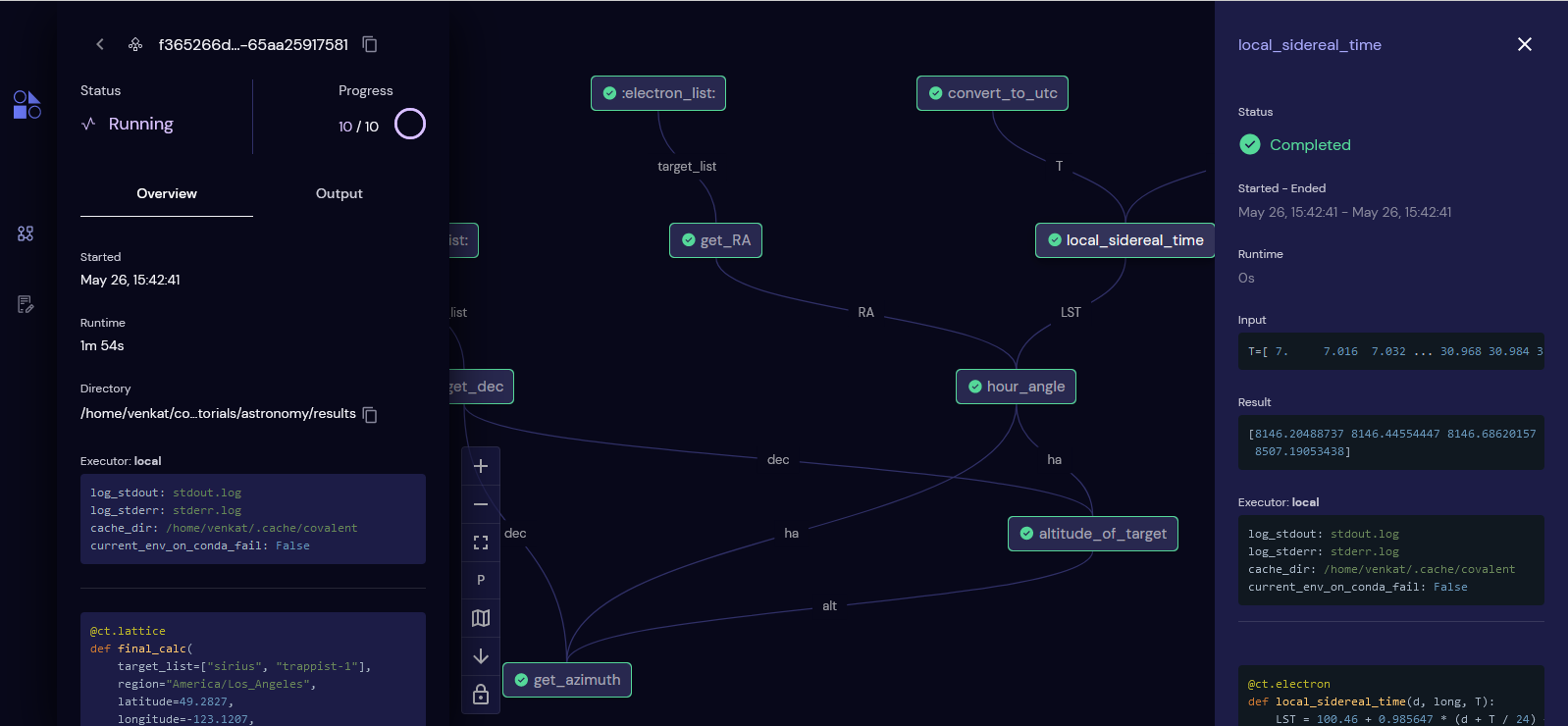
- visualize data and task dependencies in an interactive user interface
- run code in heterogenous compute environments, including in hybrid-cloud and hybrid-quantum configurations
- understand where time and money is spent across a project
Covalent may be deployed locally or on a remote server. Covalent is rapidly expanding to include support for a variety of cloud interfaces, including HPC infrastructure tools developed by major cloud providers and emerging quantum APIs. It has never been easier to deploy your code on the world's most advanced computing hardware with Covalent.
Read more in the official [documentation](https://covalent.readthedocs.io/en/latest/).
## ✨ Features
- **Purely Pythonic**: No need to learn any new syntax or mess around with YAML. Construct your complex workflow programmatically with native Python functions. By just adding one-line decorators to your functions, you can supercharge your experiments.
- **Native parallelization**: Covalent natively parallelizes mutually independent parts of your workflow.
- **Monitor with UI**: Covalent provides an intuitive and aesthetically beautiful browser-based user interface to monitor and manage your workflows.
- **Abstracted dataflow**: No need to worry about the details of the underlying data structures. Covalent takes care of data dependencies in the background while you concentrate on understanding the big picture.
- **Result management**: Covalent manages the results of your workflows. Whenever you need to modify parts of your workflow, from inputs to components, Covalent stores and saves the run of every experiment in a reproducible format.
- **Little-to-no overhead**: Covalent is designed to be as lightweight as possible and is optimized for the most common use cases. Covalent's overhead is less than 0.1% of the total runtime for typical high compute applications and often has a constant overhead of ~ 10-100μs -- and this is constantly being optimized.
- **Interactive**: Unlike other workflow tools, Covalent is interactive. You can view, modify, and re-submit workflows directly within a Jupyter notebook.
<div align="center">
</div>
For a more in-depth description of Covalent's features and how they work, refer to the [Concepts](https://covalent.readthedocs.io/en/latest/concepts/concepts.html) page in the documentation.
## 📖 Example
Begin by starting the Covalent servers:
```console
covalent start
```
Navigate to the user interface at `http://localhost:48008` to monitor workflow execution progress.
In your Python code, it's as simple as adding a few decorators! Consider the following example which uses a support vector machine (SVM) to classify types of iris flowers.
<table style='margin-left: auto; margin-right: auto; word-wrap: break-word;'>
<tr>
<th style='text-align:center;'>Without Covalent</th>
<th style='text-align:center;'>With Covalent</th>
</tr>
<tr>
<td valign="top">
``` python
from numpy.random import permutation
from sklearn import svm, datasets
def load_data():
iris = datasets.load_iris()
perm = permutation(iris.target.size)
iris.data = iris.data[perm]
iris.target = iris.target[perm]
return iris.data, iris.target
def train_svm(data, C, gamma):
X, y = data
clf = svm.SVC(C=C, gamma=gamma)
clf.fit(X[90:], y[90:])
return clf
def score_svm(data, clf):
X_test, y_test = data
return clf.score(
X_test[:90],
y_test[:90]
)
def run_experiment(C=1.0, gamma=0.7):
data = load_data()
clf = train_svm(
data=data,
C=C,
gamma=gamma
)
score = score_svm(data=data, clf=clf)
return score
result=run_experiment(C=1.0, gamma=0.7)
```
</td>
<td valign="top">
```python
from numpy.random import permutation
from sklearn import svm, datasets
import covalent as ct
@ct.electron
def load_data():
iris = datasets.load_iris()
perm = permutation(iris.target.size)
iris.data = iris.data[perm]
iris.target = iris.target[perm]
return iris.data, iris.target
@ct.electron
def train_svm(data, C, gamma):
X, y = data
clf = svm.SVC(C=C, gamma=gamma)
clf.fit(X[90:], y[90:])
return clf
@ct.electron
def score_svm(data, clf):
X_test, y_test = data
return clf.score(
X_test[:90],
y_test[:90]
)
@ct.lattice
def run_experiment(C=1.0, gamma=0.7):
data = load_data()
clf = train_svm(
data=data,
C=C,
gamma=gamma
)
score = score_svm(
data=data,
clf=clf
)
return score
dispatchable_func = ct.dispatch(run_experiment)
dispatch_id = dispatchable_func(
C=1.0,
gamma=0.7
)
result = ct.get_result(dispatch_id)
```
</td>
</tr>
<tr>
<td valign="top">
```python
>>> print(result)
0.988888888
```
</td>
<td valign="top">
```python
>>> print(f"""
... status = {result.status}
... input = {result.inputs}
... result = {result.result}
... """)
status = Status(STATUS='COMPLETED')
input = {'C': 1.0, 'gamma': 0.7}
result = 0.988888888
```
</td>
</tr>
</table>
For more examples, please refer to the [Covalent tutorials](https://covalent.readthedocs.io/en/latest/tutorials/tutorials.html).
## 📦 Installation
Covalent is developed using Python version 3.8 on Linux and macOS. The easiest way to install Covalent is using the PyPI package manager:
```console
pip install covalent
```
Refer to the [Getting Started](https://covalent.readthedocs.io/en/latest/getting_started/index.html) guide for more details on setting up. For a full list of supported platforms, consult the Covalent [compatibility matrix](https://covalent.readthedocs.io/en/latest/getting_started/compatibility.html).
## 🔧 How it Works
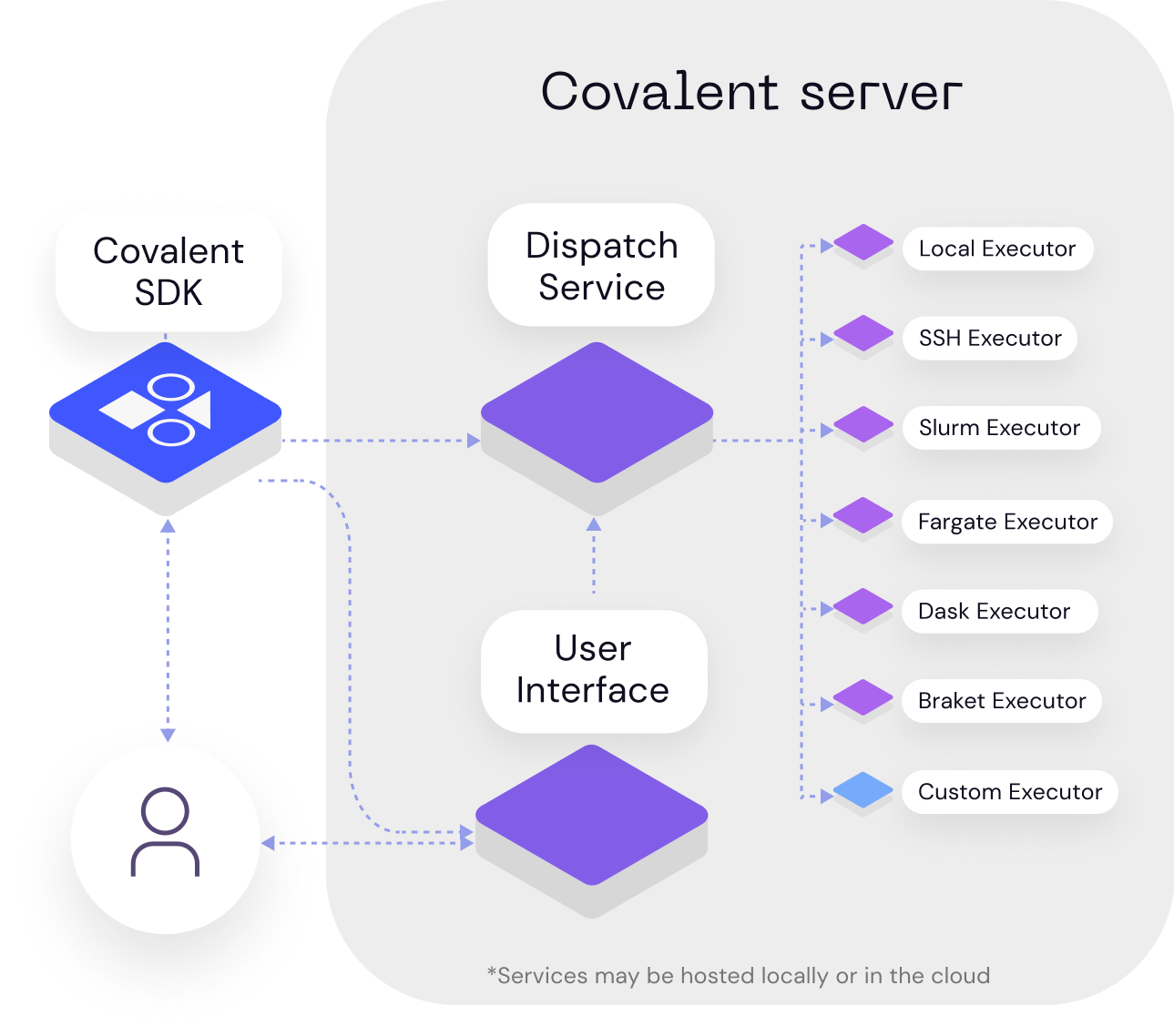
Users compose workflows using the Covalent SDK and submit them to the Covalent server. Upon receiving a workflow, the server analyzes the dependencies between tasks and dispatches each task to its specified execution backend. Independent tasks may be executed concurrently. The Covalent UI displays the execution progress of each workflow at the level of individual tasks.
<div align="center">
</div>
## 📚 Documentation
The official documentation includes tips on getting started, some high level concepts, a handful of tutorials, and the API documentation. To learn more, please refer to the [Covalent documentation](https://covalent.readthedocs.io/en/latest/).
## ✔️ Contributing
To contribute to Covalent, refer to the [Contribution Guidelines](https://github.com/AgnostiqHQ/covalent/blob/master/CONTRIBUTING.md). We use GitHub's [issue tracking](https://github.com/AgnostiqHQ/covalent/issues) to manage known issues, bugs, and pull requests. Get started by forking the develop branch and submitting a pull request with your contributions. Improvements to the documentation, including tutorials and how-to guides, are also welcome from the community. Participation in the Covalent community is governed by the [Code of Conduct](https://github.com/AgnostiqHQ/covalent/blob/master/CODE_OF_CONDUCT.md).
## 📝 Release Notes
The latest release includes two new feature sets and three major enhancements. True to its modular nature, Covalent now allows users to define custom pre- and post-hooks to electrons to facilitate various use cases from setting up remote environments (using DepsPip) to running custom functions. We also now support data/file transfers between remote electrons in a very modular way, including Rsync, HTTP, and S3 protocols. As part of the enhancements, Covalent now internally uses an SQL database instead of storing results in a serialized format, which has resulted in impressive speedups and stability across the platform. We have further made the Covalent server leaner by not requiring it to have any dependencies of electrons installed. Covalent now only requires that your electron’s software dependencies exist on the client (the machine submitting the workflows) and backend (hardware running the tasks).
Summary of major features/enhancements:
- Pre- and post-hooks to setup the software environment and to run other custom functions
- Data transfer/management between electrons
- Robust database for storing and managing results
- User interface enhancements
The detailed history of changes can be viewed in the [Changelog](https://github.com/AgnostiqHQ/covalent/blob/master/CHANGELOG.md).
## ⚓ Citation
Please use the following citation in any publications:
> W. J. Cunningham, S. K. Radha, F. Hasan, J. Kanem, S. W. Neagle, and S. Sanand.
> *Covalent.* Zenodo, 2022. https://doi.org/10.5281/zenodo.5903364
## 📃 License
Covalent is licensed under the GNU Affero GPL 3.0 License. Covalent may be distributed under other licenses upon request. See the [LICENSE](https://github.com/AgnostiqHQ/covalent/blob/master/LICENSE) file or contact the [support team](mailto:support@agnostiq.ai) for more details.




