# azely
[](https://pypi.org/project/azely/)
[](https://pypi.org/project/azely/)
[](https://pepy.tech/project/azely)
[](https://doi.org/10.5281/zenodo.3680060)
[](https://github.com/astropenguin/azely/actions)
Computation and plotting of azimuth and elevation for astronomical objects
## TL;DR
Azely (pronounced as "as-elie") is a Python package for computation and plotting of horizontal coordinates (azimuth and elevation; az/el, hereafter) of astronomical objects at given location and time.
While computation and plotting are realized by [Astropy] and [Matplotlib], what azely provides is high-level API to use them easily.
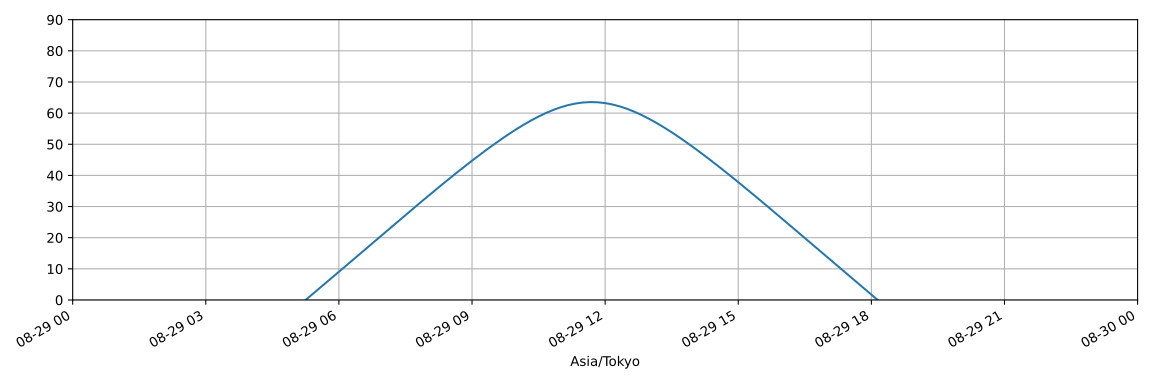
In fact azely offers one-liner to compute and plot, for example, one-day elevation of the Sun in Tokyo:
```python
>>> azely.compute('Sun', 'Tokyo').el.plot(ylim=(0, 90))
```
## Features
- **High-level API:** azely provides a simple yet powerful `compute()` function. Users can complete most of operation with it (e.g., information acquisition and computation).
- **Handy output:** azely's output (from `compute()`) is [pandas] DataFrame, a de facto standard data structure of Python. Users can convert it to other formats like CSV and plot it by [Matplotlib] using builtin methods.
- **Web information acquisition:** azely can automatically acquire object and location information (i.e., longitude and latitude) from online services (e.g., catalogues or maps). Obtained information is cached in a local [TOML] file for an offline use.
- **User-defined information:** azely also offers to use user-defined object and location information written in a [TOML] file.
## Requirements
- **Python:** 3.7, 3.8, 3.9, and 3.10 (tested by author)
- **Dependencies:** See [pyproject.toml](https://github.com/astropenguin/azely/blob/v0.7.0/pyproject.toml)
## Installation
```shell
$ pip install azely
```
## Basic usage
This section describes basic az/el computation using `compute()` function.
### Compute function
Azely's `compute()` function receives the following parameters and returns [pandas] DataFrame (`df`):
```python
>>> import azely
>>> df = azely.compute(object, site, time, view, **options)
```
This means that `azely` will `compute` az/el of `object` observed from `site` at (on) `time` in `view`.
For example, the following code will compute az/el of Sun observed from ALMA AOS on Jan. 1st 2020 in Tokyo.
```python
>>> df = azely.compute('Sun', 'ALMA AOS', '2020-01-01', 'Tokyo')
```
Acceptable formats of each parameter and examples are as follows.
| Parameter | Acceptable format | Description | Examples |
| --- | --- | --- | --- |
| `object` | `<obj. name>` | name of object to be searched | `'Sun'`, `'NGC1068'` |
| | `<toml>:<obj. name>` | user-defined object to be loaded (see below) | `'user.toml:M42'`, `'user:M42'` (also valid) |
| `site` | `'here'` (default) | current location (guess by IP address) | |
| | `<loc. name>` | name of location to be searched | `'ALMA AOS'`, `'Tokyo'` |
| | `<toml>:<loc. name>` | user-defined location to be loaded (see below) | `'user.toml:ASTE'`, `'user:ASTE'` (also valid) |
| `time` | `'today'` (default) | get one-day time range of today | |
| | `'now'` | get current time | |
| | `<time>` | start time of one-day time range | `'2020-01-01'`, `'1/1 12:00'`, `'Jan. 1st'` |
| | `<time> to <time>` | start and end of time range | `'1/1 to 1/3'`, `'Jan. 1st to Jan. 3rd'` |
| `view` | `''` (default) | use timezone of `site` | |
| | `<tz name>` | name of timezone database | `'Asia/Tokyo'`, `'UTC'` |
| | `<loc. name>` | name of location from which timezone is identified | same as `site`'s examples |
| | `<toml>:<loc. name>` | user-defined location from which timezone is identified | same as `site`'s examples |
### Output DataFrame
The output DataFrame contains az/el expressed in units of degrees and local sidereal time (LST) at `site` indexed by time in `view`:
```python
>>> print(df)
```
```plaintext
az el lst
Asia/Tokyo
2020-01-01 00:00:00+09:00 94.820323 68.416756 17:07:59.405556
2020-01-01 00:10:00+09:00 94.333979 70.709575 17:18:01.048298
2020-01-01 00:20:00+09:00 93.856123 73.003864 17:28:02.691044
2020-01-01 00:30:00+09:00 93.388695 75.299436 17:38:04.333786
2020-01-01 00:40:00+09:00 92.935403 77.596109 17:48:05.976529
... ... ... ...
2020-01-01 23:20:00+09:00 96.711830 59.146249 16:31:49.389513
2020-01-01 23:30:00+09:00 96.185941 61.431823 16:41:51.032256
2020-01-01 23:40:00+09:00 95.664855 63.719668 16:51:52.674998
2020-01-01 23:50:00+09:00 95.147951 66.009577 17:01:54.317740
2020-01-02 00:00:00+09:00 94.634561 68.301349 17:11:55.960483
[145 rows x 3 columns]
```
### Example
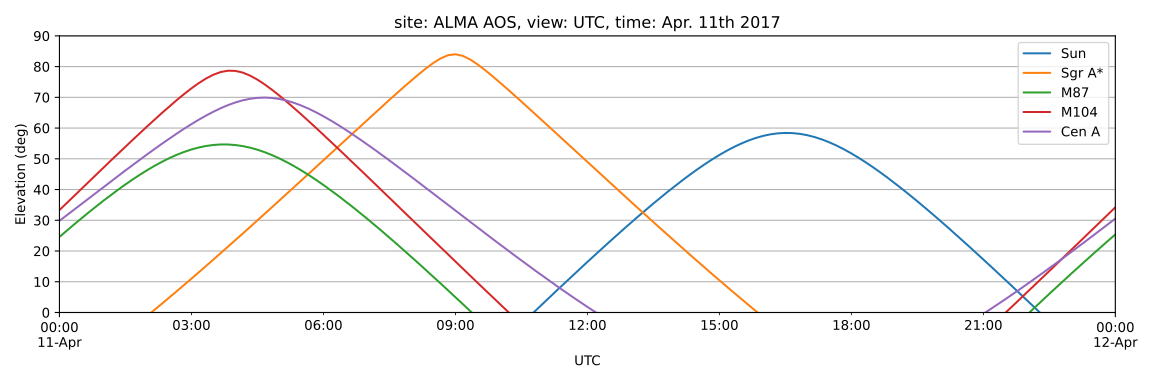
Here is a sample script which will plot one-day elevation of the Sun and candidates of black hole shadow observations at ALMA AOS on Apr. 11th 2017 in UTC.
```python
import azely
import matplotlib.pyplot as plt
plt.style.use('seaborn-whitegrid')
fig, ax = plt.subplots(figsize=(12, 4))
site = 'ALMA AOS'
time = 'Apr. 11th 2017'
view = 'UTC'
for obj in ('Sun', 'Sgr A*', 'M87', 'M104', 'Cen A'):
df = azely.compute(obj, site, time, view)
df.el.plot(ax=ax, label=obj)
ax.set_title(f'site: {site}, view: {view}, time: {time}')
ax.set_ylabel('Elevation (deg)')
ax.set_ylim(0, 90)
ax.legend()
```
## Advanced usage
This section describes advanced usage of azely by special DataFrame accessor and local [TOML] files.
Note that azely will create a config directory, `$XDG_CONFIG_HOME/azely` (if the environment variable exists) or `~/.config/azely`, after importing `azely` for the first time.
[TOML] files for configuration (`config.toml`) and cached information (`objects.toml`, `locations.toml`) will be automatically created in it.
### Plotting in local sidereal time
The `compute()` function does not accept local sidereal time (LST) as `view` (i.e., `view='LST'`) because LST has no information on year and date.
Instead an output DataFrame has `in_lst` property which provides az/el with a LST index converted from the original time index.
For example, the following code will plot elevation of an object in LST:
```python
>>> df.in_lst.el.plot()
```
In order to use LST values as an index of DataFrame, LST has pseudo dates which start from `1970-01-01`.
Please ignore them or hide them by using [Matplotlib] DateFormatter when you plot the result.
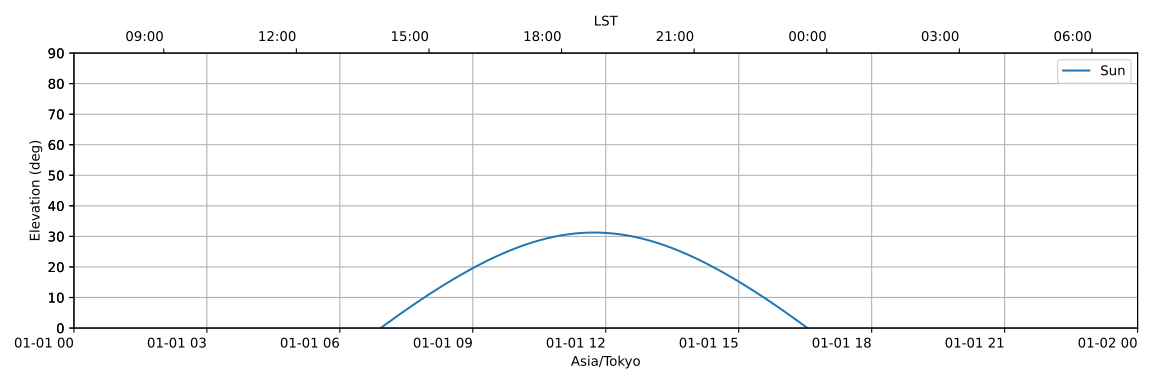
Here is a sample script which has JST time axis at the bottom and LST axis at the top of a figure, respectively.
```python
import matplotlib.dates as mdates
fig, ax = plt.subplots(figsize=(12, 4))
twin = ax.twiny()
df = azely.compute('Sun', 'Tokyo', '2020-01-01')
df.el.plot(ax=ax, label=df.object.name)
df.in_lst.el.plot(ax=twin, alpha=0)
ax.set_ylabel("Elevation (deg)")
ax.set_ylim(0, 90)
ax.legend()
formatter = mdates.DateFormatter('%H:%M')
twin.xaxis.set_major_formatter(formatter)
fig.autofmt_xdate(rotation=0)
```
### User-defined information
Azely offers to use user-defined information from a [TOML] file.
Here is a sample TOML file (e.g., `user.toml`) which has custom object and location informaiton.
```
# user.toml
[ASTE]
name = "ASTE Telescope"
longitude = "-67.70317915"
latitude = "-22.97163575"
altitude = "0"
[GC]
name = "Galactic center"
frame = "galactic"
longitude = "0deg"
latitude = "0deg"
```
If it is located in a current directory or in the azely's config directory, users can use the information like:
```python
>>> df = azely.compute('user:GC', 'user:ASTE', '2020-01-01')
```
### Cached information
Object and location information obtained from online services is cached to [TOML] files (`objects.toml`, `locations.toml`) in the azely's config directory with the same format as user-defined files.
If a query argument is given with `'!'` at the end of it, then the cached values are forcibly updated by a new acquisition.
This is useful, for example, when users want to update a current location:
```python
>>> df = azely.compute('Sun', 'here!', '2020-01-01')
```
### Customizing default values
Users can modify default values of the `compute()` function by editing the azely's config [TOML] file (`config.toml`) in the azely's config directory like:
```
# config.toml
[compute]
site = "Tokyo"
time = "now"
```
Then `compute('Sun')` becomes equivalent to `compute('Sun', 'Tokyo', 'now')`.
<!-- references -->
[Astropy]: https://astropy.org
[Matplotlib]: https://matplotlib.org
[pandas]: https://pandas.pydata.org
[TOML]: https://toml.io




